
7、隧道工具

作者: Brinnatt 分类: ARM64 Linux CICD 研发 发布时间: 2025-01-18 09:39

7.1、openvpn

OpenVPN 官方地址:https://github.com/OpenVPN/openvpn

OpenVPN 的功能很强大,我们并没有深入研究该工具,按照以下步骤配置,基本上够用。

7.1.2、环境准备

软硬件版本

硬件 操作系统 软件
ARM64 ft2000+ centos7.5 easy-rsa3.0.6 openvpn2.4.7

软件安装源

# cat /etc/yum.repos.d/CentOS-Base.repo
[base]
name=CentOS-$releasever - Base
baseurl=https://mirrors.aliyun.com/centos-altarch/$releasever/os/$basearch/
gpgcheck=1
gpgkey=https://mirrors.aliyun.com/centos/RPM-GPG-KEY-CentOS-7

#released updates
[updates]
name=CentOS-$releasever - Updates
baseurl=https://mirrors.aliyun.com/centos-altarch/$releasever/updates/$basearch/
gpgcheck=1
gpgkey=https://mirrors.aliyun.com/centos/RPM-GPG-KEY-CentOS-7

#additional packages that may be useful
[extras]
name=CentOS-$releasever - Extras
baseurl=https://mirrors.aliyun.com/centos-altarch/$releasever/extras/$basearch/
gpgcheck=1
gpgkey=https://mirrors.aliyun.com/centos/RPM-GPG-KEY-CentOS-7
enabled=1

#additional packages that extend functionality of existing packages
[centosplus]
name=CentOS-$releasever - Plus
baseurl=https://mirrors.aliyun.com/centos-altarch/$releasever/centosplus/$basearch/
gpgcheck=1
enabled=0
gpgkey=https://mirrors.aliyun.com/centos/RPM-GPG-KEY-CentOS-7
# cat /etc/yum.repos.d/epel.repo
[epel]
name=Extra Packages for Enterprise Linux 7 - $basearch
#baseurl=http://download.fedoraproject.org/pub/epel/7/$basearch
metalink=https://mirrors.fedoraproject.org/metalink?repo=epel-7&arch=$basearch
failovermethod=priority
enabled=1
gpgcheck=1
gpgkey=file:///etc/pki/rpm-gpg/RPM-GPG-KEY-EPEL-7

安装软件包

# yum install easy-rsa openvpn -y
Loaded plugins: fastestmirror
Loading mirror speeds from cached hostfile
 * epel: mirrors.yun-idc.com
Package easy-rsa-3.0.6-1.el7.noarch already installed and latest version
Package openvpn-2.4.7-1.el7.aarch64 already installed and latest version
Nothing to do

7.1.3、配置 easy-rsa 3.0.6

安装完 easy-rsa 3.0.6 后,默认会生成 easyrsa 脚本文件和 vars.example 环境变量文件,这两个文件是核心文件,找到这两个文件所在的目录,复制到相应的位置,然后根据自己的需求配置 vars

# find /usr/ -name easyrsa -o -name vars.example
/usr/share/doc/easy-rsa-3.0.6/vars.example
/usr/share/easy-rsa/3.0.6/easyrsa
# cp -r /usr/share/easy-rsa/3.0.6/ /etc/openvpn/3.0.6/
# cp /usr/share/doc/easy-rsa-3.0.6/vars.example /etc/openvpn/3.0.6/vars
# grep -v "^#\|^$" /etc/openvpn/3.0.6/vars
if [ -z "$EASYRSA_CALLER" ]; then
    echo "You appear to be sourcing an Easy-RSA 'vars' file." >&2
    echo "This is no longer necessary and is disallowed. See the section called" >&2
    echo "'How to use this file' near the top comments for more details." >&2
    return 1
fi
set_var EASYRSA_REQ_COUNTRY "CN"
set_var EASYRSA_REQ_PROVINCE    "HuNan"
set_var EASYRSA_REQ_CITY    "ChangSha"
set_var EASYRSA_REQ_ORG "Greatwall Corporation"
set_var EASYRSA_REQ_EMAIL   "yuliangliang@greatwall.com.cn"
set_var EASYRSA_REQ_OU      "Product Department"
[root@openvpn ~]# 

7.1.3.1、easyrsa 命令使用

查看整体帮助
# ./easyrsa -h

查看某个子命令的详细帮助
# ./easyrsa help import-req

查看可以用到的 options
# ./easyrsa help options

7.1.3.2、创建 PKI 和 CA

# cd /etc/openvpn/3.0.6/
# ./easyrsa init-pki
# ls
easyrsa  openssl-easyrsa.cnf  pki  vars  x509-types
# ./easyrsa build-ca nopass (配置好了vars直接回车即可)

执行 ./easyrsa init-pki 后,EasyRSA 会在当前目录下创建一个名为 pki 的目录结构,包含以下内容:

  • pki/private:用于存放私钥文件,权限严格受限,确保密钥的安全。
  • pki/reqs:用于存放证书签名请求(CSR)。
  • pki/issued:用于存放签名后的证书(例如 .crt 文件)。
  • pki/certs_by_serial:存放按序列号命名的已签发证书(通常只在调试或跟踪中使用)。
  • pki/index.txt:一个索引文件,用于跟踪签发的所有证书。
  • pki/serial:一个文件,用于记录下一个将要分配的证书序列号。

命令 ./easyrsa build-ca nopass 是使用 EasyRSA 工具创建一个证书颁发机构(CA, Certificate Authority)的根证书和私钥。它是建立 PKI(公钥基础设施)中最重要的一步。

build-ca:子命令,表示创建一个证书颁发机构(CA)。

  • 该命令会生成 CA 的私钥和根证书。
  • CA 的主要作用是签署证书签名请求(CSR),生成可信任的服务器或客户端证书。
  • 根证书是所有后续签名的基础。

nopass:选项,表示生成的 CA 私钥不设置密码保护。

  • 如果没有 nopass,生成的私钥需要设置一个密码,每次使用时需要输入密码。

运行命令后,会在 pki 目录中生成以下文件:

  1. pki/private/ca.key:CA 的私钥文件,用于签署证书。必须妥善保管,泄露会导致整个 PKI 系统的安全性失效。
  2. pki/ca.crt:CA 的根证书,用于验证由 CA 签发的所有证书。这个文件通常会分发给客户端或服务器,用于信任链的验证。

7.1.3.3、创建服务端证书

# ./easyrsa gen-req server nopass (回车即可)

./easyrsa:这是 EasyRSA 工具的可执行脚本,用于管理私钥、证书、证书请求等。

gen-req:这个子命令用于生成证书签名请求(CSR)。它会同时生成一个私钥文件和一个与之关联的证书签名请求文件。

server:这是证书签名请求的名称(common name, CN)。生成的文件会以这个名字命名,比如:

  • 私钥:server.key
  • CSR 文件:server.req

nopass:这个选项表示生成的私钥文件不需要设置密码保护。如果没有 nopass,生成的私钥文件会要求输入密码才能使用。

7.1.3.4、签约服务端证书

[root@openvpn 3.0.6]# ./easyrsa sign server server

signEasyRSA 子命令,表示对证书签名请求(CSR)进行签名。

server:表示证书的类型。

  • server 类型的证书通常用于服务器(如 OpenVPN 服务器)。
  • EasyRSA 会根据配置为服务器证书添加相关扩展字段(如 extendedKeyUsage = serverAuth)。

server:第二个 server 是证书签名请求(CSR)的名称,与之前通过 gen-req 生成时的名称一致。

  • 它表示要签名的 CSR 文件,通常是 pki/reqs/server.req
  • 签名后的证书会被命名为 server.crt,并保存在 pki/issued/ 目录下。

7.1.3.5、创建 Diffie-Hellman

# ./easyrsa gen-dh

Diffie-Hellman (DH) 是一种密钥交换协议,用于安全生成共享密钥。

  • 在 SSL/TLS 通信中,它用于支持 Perfect Forward Secrecy (PFS),即使私钥泄露,之前的通信数据仍然无法解密。
  • 在 OpenVPN 服务器配置中,DH 参数文件是服务器端密钥交换的一部分,确保客户端与服务器之间的通信加密。

7.1.3.6、客户端证书请求

# ./easyrsa gen-req jiajia nopass

7.1.3.7、签约客户端证书

# ./easyrsa sign client jiajia

注意:这里的客户端证书用到的 pki 目录跟服务器端的 pki 目录是一样的,所以可以直接 sign 签署,如果客户端重新生成了 pki,那每次生成的证书请求文件都需要用 ./easyrsa import-req $PATH/jiajia.req jiajia 导入并取一个短名字 jiajia,然后执行 ./easyrsa sign client jiajia

参见 ./easy-rsa help import-req

7.1.3.8、生成 ta.key 文件

[root@openvpn 3.0.6]# openvpn --genkey --secret ta.key

命令 openvpn --genkey --secret ta.key 是用于生成一个预共享密钥(TA 密钥,TLS Authentication Key)。这在 OpenVPN 中主要用于增强安全性,防止未经授权的连接尝试和某些类型的攻击(如 DoS 攻击)。

--genkey:生成密钥的选项。

--secret ta.key:指定生成的密钥文件名为 ta.key

  • 这个密钥是一个对称密钥,客户端和服务器共享。
  • 文件内容是一个随机生成的 2048 位密钥。

TLS Authentication:TA 密钥用于 OpenVPN 的 TLS 认证模式。在 TLS 握手过程中,只有提供正确的 TA 密钥的客户端才会被服务器接受。

  • 防止未经授权的连接尝试。
  • 增加防火墙规则配置的灵活性。

防御攻击:TA 密钥能有效阻止某些类型的攻击。

  • 防止 DoS 攻击:通过过滤非授权数据包减轻负载。
  • 防止中间人攻击:确保握手数据的完整性。

OpenVPN 2.5.5 版本:
openvpn --genkey secret ta.key

7.1.3.9、整理证书

# pwd
/etc/openvpn/3.0.6
# ll pki/private/
-rw-------. 1 root root 1679 Jun  9 21:05 ca.key
-rw-------. 1 root root 1708 Jun  9 21:06 server.key
# ll pki/issued/
-rw-------. 1 root root 4552 Jun  9 21:18 server.crt
# ll pki/ca.crt 
-rw-------. 1 root root 1172 Jun  9 21:05 pki/ca.crt
# ll pki/dh.pem 
-rw-------. 1 root root 424 Jun  9 21:10 pki/dh.pem
# cp ta.key pki/
# ll pki/ta.key 
-rw-------. 1 root root 636 Jun  9 21:31 pki/ta.key

以上配置文件将会在服务器端和端户端配置文件中指出。

7.1.4、服务器端配置文件

# grep -vE "^#|^$" /etc/openvpn/server.conf 
local 172.18.1.206
port 1194
proto tcp
dev tun
ca /etc/openvpn/3.0.6/pki/ca.crt
cert /etc/openvpn/3.0.6/pki/issued/server.crt
key /etc/openvpn/3.0.6/pki/private/server.key
dh /etc/openvpn/3.0.6/pki/dh.pem
server 10.8.0.0 255.255.255.0
ifconfig-pool-persist ipp.txt
# 向客户端推送路由,客户端会配置172.17.0.0/16 gw 10.8.0.1,这样客户端连接172.17.0.0/16网段会走vpn隧道
push "route 172.17.0.0 255.255.0.0"
keepalive 10 120
# tls-auth ta.key [0|1],服务端 0,客户端 1
tls-auth /etc/openvpn/3.0.6/pki/ta.key 0
cipher AES-256-CBC
comp-lzo
persist-key
persist-tun
status openvpn-status.log
verb 3
reneg-sec 0

# 注意,这个文件用来记录被吊销的证书,阻止被吊销的客户再次登陆
# 默认没有这个文件,必须执行 ./easyrsa gen-crl 更新生成,否则服务启不来
crl-verify /etc/openvpn/3.0.6/pki/crl.pem

7.1.5、启动 openvpn 服务

# systemctl start openvpn@server.service
# systemctl enable openvpn@server.service

7.1.6、配置 iptables 规则

为了可以让客户端访问服务器所在局域网的其它主机,需要配置如下规则:

# iptables -t nat -A POSTROUTING -s 10.8.0.0/24 -j MASQUERADE
# echo "1" > /proc/sys/net/ipv4/ip_forward
# cat /proc/sys/net/ipv4/ip_forward
1

注意:源地址转换的网段使用 10.8.0.0/24,不要使用 10.8.0.0/8,因为网段范围太大会误伤其他 10.x.x.x 段的流量,亲身经历因为配置了 8 掩码干漰了整个 k8s 生产环境。

这条 nat 规则的原理:

  • 局域网内的其他主机(如 172.17.0.100)上并不存在 10.8.0.0/8 这个网段,因为只有 vpn 服务器才有 tun0 隧道接口,是这个网段。
  • VPN 客户端(如 10.8.0.2)向 172.17.0.100 发送数据包。
    • 原始数据包源 IP:10.8.0.2
    • 目的 IP:172.17.0.100
    • 这个包进入 VPN 服务器
  • VPN 服务器 MASQUERADE 将源 IP 10.8.0.2 修改为 VPN 服务器的局域网 IP(如 172.17.0.10)。
    • 172.17.0.10 与 172.17.0.100 属于同网段局域网,相互可以正常收发数据包。
    • VPN 服务器将 172.17.0.10 改回 10.8.0.2,然后转发回 VPN 客户端。

结合 push "route 172.17.0.0 255.255.0.0" 这条配置,路线如下:
客户端访问 172.17.0.0/16 --> vpn 隧道 10.8.0.1 --> 源地址伪装 172.17.0.0/16 --> 局域 172.17.0.0/16 所有主机

生产环境遇到的问题:
就算配置了以上两种规则,vpn 客户端还是不能访问 vpn 服务器所在的局域网,什么原因?
通过排查 iptables 规则,发现 forward 链默认是 DROP,而恰恰从隧道过来去访问 vpn 服务器局域网内其它主机,要走 forward 链,原理参考:https://brinnatt.com/further/第-2-章-linux-防火墙/

解决方法:

# iptables -N OPENVPN_FORWARD_INNER
# iptables -A OPENVPN_FORWARD_INNER -s 10.8.0.0/24 -d 10.58.121.0/24 -j ACCEPT
# iptables -A OPENVPN_FORWARD_INNER -s 10.58.121.0/24 -d 10.8.0.0/24 -j ACCEPT
# iptables -A FORWARD -j OPENVPN_FORWARD_INNER
# iptables -A OPENVPN_FORWARD_INNER -j RETURN

未指定表,默认是处理 filter 表。

7.1.7、客户端的配置文件

将 ca.crt、ta.key、用户证书与私钥(如 yll.crt、yll.key)与 .ovpn 放在同一目录,或使用绝对路径。remote、cert、key 按实际修改。

client
dev tun
proto tcp
remote 36.158.226.1 16001
resolv-retry infinite
persist-key
persist-tun
mute-replay-warnings
ca ca.crt
cert yll.crt
key yll.key
remote-cert-tls server
tls-auth ta.key 1
cipher AES-256-CBC
compress lzo
verb 3
mute 20
reneg-sec 0

与服务器一致:使用 compress lzo(或与服务器协商的压缩方式),不要使用已弃用的 comp-lzo。

7.1.8、生成或吊销客户端证书

#!/usr/bin/env python3
# -*- coding: utf-8 -*-
"""
OpenVPN 客户端证书签发 / 吊销(Easy-RSA 3.0.7)

标准目录(/etc/openvpn/,详见 PKI_LAYOUT 与 -h):
  <Easy-RSA>/pki/  issued/ private/ reqs/ revoked/ certs_by_serial/(默认 3.0.7)
  client/          create 输出;pki/ta.key 为 OpenVPN tls-auth(非 easyrsa 生成)
  server/          server.conf 须 crl-verify → pki/crl.pem

有效证书: pki/issued/<用户>.crt 存在(权威判定,优先于 index.txt)
index.txt: 同一 CN 可有多行 V/R(重签/吊销历史);无 issued 时以末条状态为准
吊销后:   easyrsa revoke → move_revoked 按 serial 归档,须再执行 gen-crl

环境变量: GENOVPN_OPENVPN_BASE / GENOVPN_EASYRSA_DIR / GENOVPN_EASYRSA_VERSION
(默认面向 Easy-RSA 3.0.7,与上游 easyrsa3/easyrsa 行为对齐)

控制台日志块(与 -h / 运行输出一致,详见 LOG_CONSOLE_HELP):
  [结果] [说明] [核验 · 标题];末尾 --- 操作完成 · 用户 --- 摘要
"""

from __future__ import print_function

import argparse
import logging
import os
import re
import shutil
import subprocess
import sys
from logging.handlers import RotatingFileHandler
from typing import Dict, List, Optional, Tuple, TypedDict, cast

# ---------------------------------------------------------------------------
# 日志
# ---------------------------------------------------------------------------
LOG_DIR = os.environ.get("GENOVPN_LOG_DIR", "/var/log/openvpn")
LOG_FILE = os.path.join(LOG_DIR, "genovpnuser.log")
LOG_LEVEL = logging.INFO
LOG_FORMAT = "[%(asctime)s] [%(levelname)s] [%(name)s] %(message)s"
LOG_DATEFMT = "%Y-%m-%d %H:%M:%S"

# ---------------------------------------------------------------------------
# 配置(对齐 /etc/openvpn/ 标准布局;路径可由环境变量覆盖)
# ---------------------------------------------------------------------------
# 脚本按 Easy-RSA v3.0.7 源码约定实现(revoke → move_revoked → gen-crl):
EASYRSA_UPSTREAM_TAG = "v3.0.7"
EASYRSA_UPSTREAM_URL = (
    "https://github.com/OpenVPN/easy-rsa/blob/{0}/easyrsa3/easyrsa"
).format(EASYRSA_UPSTREAM_TAG)
OPENVPN_BASE = os.environ.get("GENOVPN_OPENVPN_BASE", "/etc/openvpn")
EASYRSA_VERSION = os.environ.get("GENOVPN_EASYRSA_VERSION", "3.0.7")
EASYRSA_DIR = os.environ.get(
    "GENOVPN_EASYRSA_DIR",
    os.path.join(OPENVPN_BASE, EASYRSA_VERSION),
)
CLIENT_DIR = os.environ.get("GENOVPN_CLIENT_DIR", os.path.join(OPENVPN_BASE, "client"))
SERVER_DIR = os.path.join(OPENVPN_BASE, "server")
SERVER_CONF = os.path.join(SERVER_DIR, "server.conf")
SERVER_STATUS_LOG = os.path.join(SERVER_DIR, "openvpn-status.log")
SERVER_IPP = os.path.join(SERVER_DIR, "ipp.txt")

# Easy-RSA verify_ca_init / verify_pki_init 要求的 PKI 条目(v3.0.7)
EASYRSA_PKI_REQUIRED = (
    "pki/index.txt",
    "pki/index.txt.attr",
    "pki/serial",
    "pki/ca.crt",
    "pki/private/ca.key",
    "pki/private",
    "pki/reqs",
    "pki/issued",
    "pki/certs_by_serial",
    "pki/revoked",
    "pki/revoked/certs_by_serial",
    "pki/revoked/private_by_serial",
    "pki/revoked/reqs_by_serial",
)
# OpenVPN 客户端包依赖(非 easyrsa 生成;openvpn --genkey secret pki/ta.key)
OPENVPN_PKI_EXTRA = ("pki/ta.key",)

DEFAULT_REMOTE_HOST = "61.187.64.38"
DEFAULT_REMOTE_PORT = 11940

# Easy-RSA 内置/server 证书名,禁止作为客户端用户名
RESERVED_USERS = frozenset(["server", "ca"])

USER_RE = re.compile(r"^[a-zA-Z][a-zA-Z0-9_]{2,15}$")
CN_ATTR_RE = re.compile(r"^CN\s*=\s*(.+)$", re.IGNORECASE)
CN_SLASH_RE = re.compile(r"/CN=([^/]+)", re.IGNORECASE)

HISTORY_NONE = "none"
HISTORY_REVOKED = "revoked"
HISTORY_EXPIRED = "expired"

HISTORY_LABEL = {
    HISTORY_NONE: "无历史记录",
    HISTORY_REVOKED: "已吊销",
    HISTORY_EXPIRED: "已过期",
}

STATUS_LABEL = {
    "valid": "有效",
    "revoked": "已吊销",
    "expired": "已过期",
    "none": "不存在",
}

# 目录树说明;硬性检查见 EASYRSA_PKI_REQUIRED / OPENVPN_PKI_EXTRA(须同步维护)
PKI_LAYOUT = """
/etc/openvpn/ 标准布局(Easy-RSA {ver} + OpenVPN,上游 {upstream})
├── {ver}/                  Easy-RSA 工作区(EASYRSA=/ GENOVPN_EASYRSA_DIR)
│   ├── easyrsa / vars      签发工具与变量
│   └── pki/                PKI(openssl ca 数据库,见 openssl-easyrsa.cnf)
│       ├── ca.crt          CA 证书
│       ├── ta.key          OpenVPN tls-auth(openvpn --genkey,非 easyrsa 生成)
│       ├── crl.pem         吊销列表(revoke 后须 easyrsa gen-crl)
│       ├── dh.pem          DH 参数(easyrsa gen-dh,仅服务端需要)
│       ├── index.txt       台账 V/R/E(重签/吊销追加行,非覆盖)
│       ├── index.txt.attr  须含 unique_subject = no(续签同 CN)
│       ├── issued/         有效证书 <CN>.crt(revoke 后 move_revoked 移走)
│       ├── private/        有效私钥 <CN>.key
│       ├── reqs/           证书请求 <CN>.req
│       ├── certs_by_serial/<SERIAL>.pem  签发索引(revoke 时删除)
│       ├── revoked/        move_revoked 归档(按 serial 文件名)
│       │   ├── certs_by_serial/<SERIAL>.crt
│       │   ├── private_by_serial/<SERIAL>.key
│       │   └── reqs_by_serial/<SERIAL>.req
│       └── renewed/        renew 时 move_renewed(本脚本未调用 renew)
├── client/                 create 输出 client/<用户>/client.ovpn
└── server/
    └── server.conf         crl-verify 须指向 pki/crl.pem

说明: init-pki 仅建 private/ reqs/;build-ca 建 issued/ revoked/* 等;crl.pem 首次 revoke 后 gen-crl 生成。
""".format(ver=EASYRSA_VERSION, upstream=EASYRSA_UPSTREAM_TAG).strip()

# 控制台输出说明(模块文档、-h、USER_EPILOG 共用,与 GenovpnLogger 实现一致)
LOG_CONSOLE_HELP = """
控制台输出:
  === 开始/完成 ===     阶段标题
  操作: / 日志:         命令与日志文件路径
  [N/M] 步骤            进度;行首 → 表示该步结果
  [结果]                本步客观结果(路径为相对 /etc/openvpn 的短路径)
  [说明]                业务含义、交付与后续提示
  [核验 · 标题]         操作建议(非 shell 命令清单)
  --- 标题 ---          末尾摘要(行首 · 为要点)
  失败时: [当前状态 · 用户](简要)、[后续操作]
""".strip()

# ---------------------------------------------------------------------------
# 异常
# ---------------------------------------------------------------------------

class GenovpnError(Exception):
    """业务错误,退出码 1。"""

    def __init__(self, message, hint=None):
        super(GenovpnError, self).__init__(message)
        self.message = message
        self.hint = hint

class GenovpnLogger(object):
    """
    RotatingFileHandler 写文件;仅 extra to_stdout=True 的行上屏。
    块标签与结构见 LOG_CONSOLE_HELP;result / note / verify / summary 对应实现。
    """

    _ready = False

    def __init__(self, name="genovpnuser"):
        self.logger = logging.getLogger(name)
        self.log_file = LOG_FILE
        if not GenovpnLogger._ready:
            self._setup()
            GenovpnLogger._ready = True

    def _ensure_log_dir(self):
        for candidate in (LOG_DIR, os.path.join(os.getcwd(), "logs")):
            try:
                os.makedirs(candidate, exist_ok=True)
                if os.access(candidate, os.W_OK):
                    return candidate
            except OSError:
                continue
        return os.getcwd()

    def _setup(self):
        log_dir = self._ensure_log_dir()
        self.log_file = os.path.join(log_dir, "genovpnuser.log")

        self.logger.setLevel(LOG_LEVEL)
        self.logger.propagate = False
        if self.logger.handlers:
            return

        formatter = logging.Formatter(LOG_FORMAT, LOG_DATEFMT)

        file_handler = RotatingFileHandler(
            self.log_file,
            maxBytes=10 * 1024 * 1024,
            backupCount=5,
        )
        file_handler.setFormatter(formatter)
        file_handler.setLevel(LOG_LEVEL)
        file_handler.addFilter(
            lambda record: not getattr(record, "skip_file", False)
        )

        stdout_handler = logging.StreamHandler(sys.stdout)
        stdout_handler.setFormatter(formatter)
        stdout_handler.setLevel(LOG_LEVEL)
        stdout_handler.addFilter(
            lambda record: getattr(record, "to_stdout", False)
        )

        self.logger.addHandler(file_handler)
        self.logger.addHandler(stdout_handler)

    def _emit(self, level, msg, to_stdout=False, skip_file=False):
        self.logger.log(
            level,
            msg,
            extra={"to_stdout": to_stdout, "skip_file": skip_file},
        )

    def debug(self, msg):
        self._emit(logging.DEBUG, msg)

    def info(self, msg, to_stdout=False):
        self._emit(logging.INFO, msg, to_stdout=to_stdout)

    def warning(self, msg):
        self._emit(logging.WARNING, msg, to_stdout=True)

    def error(self, msg):
        self._emit(logging.ERROR, msg, to_stdout=True)

    def phase_start(self, title):
        self.info("=== 开始: {0} ===".format(title), to_stdout=True)

    def phase_end(self, title, note=""):
        suffix = " ({0})".format(note) if note else ""
        self.info("=== 完成: {0}{1} ===".format(title, suffix), to_stdout=True)

    def meta(self, lines):
        """操作元信息:时间戳由 logging 自动附加,此处记录命令上下文。"""
        for line in lines:
            self.info(line, to_stdout=True)

    def step(self, index, total, action):
        self.info("[{0}/{1}] {2}".format(index, total, action), to_stdout=True)

    def step_ok(self, detail="通过"):
        self.info("  → {0}".format(detail), to_stdout=True)

    def step_block(self, tag, lines):
        self.info("  [{0}]".format(tag), to_stdout=True)
        for line in lines:
            self.info("    {0}".format(line), to_stdout=True)

    def result(self, lines):
        self.step_block("结果", _as_lines(lines))

    def verify(self, title, lines):
        """操作完成后的简要核验提示(非 shell 命令清单)。"""
        self.step_block("核验 · {0}".format(title), _as_lines(lines))

    def note(self, lines):
        self.step_block("说明", _as_lines(lines))

    def summary(self, headline, lines):
        self.info("--- {0} ---".format(headline), to_stdout=True)
        for line in _as_lines(lines):
            self.info("  · {0}".format(line), to_stdout=True)

def _as_lines(lines):
    if lines is None:
        return []
    if isinstance(lines, (list, tuple)):
        return [line for line in lines if line]
    return [lines]

log = GenovpnLogger()

def prog_name():
    return os.path.basename(sys.argv[0]) or "genovpnuser.py"

def cmd_hint(action, user=None, extra=None):
    parts = [prog_name(), action]
    if user:
        parts.extend(["--user", user])
    if extra:
        parts.extend(extra)
    return " ".join(parts)

def hint_create(user, **kwargs):
    extra = []
    if kwargs.get("rhost"):
        extra.extend(["--rhost", kwargs["rhost"]])
    if kwargs.get("rport"):
        extra.extend(["--rport", str(kwargs["rport"])])
    return cmd_hint("create", user, extra or None)

def hint_revoke(user):
    return cmd_hint("revoke", user)

def hint_status(user):
    return cmd_hint("status", user)

def log_failure(error):
    log.error("操作失败: {0}".format(error.message))
    if error.hint:
        log.step_block("后续操作", _as_lines(error.hint))

def log_user_status(user, brief=False):
    _, lines = describe_user_status(user)
    if brief:
        brief_lines = [lines[0]]
        for line in lines[1:]:
            if line.startswith("serial:"):
                brief_lines.append(line)
                break
        lines = brief_lines
    log.step_block("当前状态 · {0}".format(user), lines)

# ---------------------------------------------------------------------------
# 命令执行
# ---------------------------------------------------------------------------

def run_cmd(cmd, cwd=None, env=None, check=True):
    """执行命令,返回 CompletedProcess(Python 3.6 兼容)。"""
    log.debug("执行命令: {0}".format(" ".join(cmd)))
    merged = os.environ.copy()
    if env:
        merged.update(env)
    proc = subprocess.run(
        cmd,
        cwd=cwd,
        env=merged,
        stdout=subprocess.PIPE,
        stderr=subprocess.STDOUT,
        universal_newlines=True,
    )
    if proc.returncode != 0:
        log.debug(
            "命令退出码 {0}: {1}".format(
                proc.returncode, (proc.stdout or "").strip()
            )
        )
    if check and proc.returncode != 0:
        detail = (proc.stdout or "").strip()
        raise GenovpnError(
            "命令执行失败(退出码 {0})\n    {1}".format(
                proc.returncode, " ".join(cmd)
            ),
            hint=detail if detail else None,
        )
    return proc

def easyrsa_bin_path():
    return os.path.join(EASYRSA_DIR, "easyrsa")

def easyrsa(*args):
    """在 EASYRSA_DIR 下以批处理模式调用 easyrsa(等同官方 EASYRSA_BATCH=1)。"""
    return run_cmd(
        [easyrsa_bin_path()] + list(args),
        cwd=EASYRSA_DIR,
        env={"EASYRSA_BATCH": "1"},
    )

def read_easyrsa_bundle_version():
    """
    从工作区 ChangeLog 读取 Easy-RSA 发行版本(v3.0.7  tarball 根目录常见)。
    无法解析时返回 None。
    """
    changelog = os.path.join(EASYRSA_DIR, "ChangeLog")
    if not os.path.isfile(changelog):
        return None
    try:
        with open(changelog, "r") as fh:
            for line in fh:
                m = re.match(r"^(\d+\.\d+\.\d+)", line)
                if m:
                    return m.group(1)
    except OSError:
        return None
    return None

def assert_easyrsa_version():
    """目录名与 ChangeLog 版本应与脚本面向的 EASYRSA_VERSION 一致。"""
    dir_name = os.path.basename(os.path.realpath(EASYRSA_DIR))
    expected = EASYRSA_VERSION
    if dir_name != expected:
        raise GenovpnError(
            "Easy-RSA 目录名与脚本要求不一致",
            hint=(
                "脚本面向 Easy-RSA {0}(见 GENOVPN_EASYRSA_VERSION)\n"
                "当前目录名: {1}\n"
                "工作目录:   {2}".format(expected, dir_name, EASYRSA_DIR)
            ),
        )
    bundle_ver = read_easyrsa_bundle_version()
    if bundle_ver and bundle_ver != expected:
        raise GenovpnError(
            "Easy-RSA 发行版本与脚本要求不一致",
            hint=(
                "ChangeLog 版本: {0}\n"
                "脚本要求:       {1}\n"
                "请使用 v{1} 或更新脚本常量后充分回归测试。".format(
                    bundle_ver, expected
                )
            ),
        )

def openssl_version():
    proc = run_cmd(["openssl", "version"], check=False)
    if proc.returncode == 0:
        return (proc.stdout or "").strip()
    return None

# ---------------------------------------------------------------------------
# PKI 路径与证书解析
# ---------------------------------------------------------------------------

class ServerConfSummary(TypedDict):
    exists: bool
    crl_verify: Optional[str]
    crl_matches_pki: Optional[bool]
    port: Optional[str]
    proto: Optional[str]

def path_label(abs_path: str) -> str:
    """日志用短路径(相对 /etc/openvpn)。"""
    abs_path = os.path.normpath(abs_path)
    base = OPENVPN_BASE + os.sep
    if abs_path.startswith(base):
        return abs_path[len(base):]
    return abs_path

def pki_path(*parts: str) -> str:
    return cast(str, os.path.join(EASYRSA_DIR, "pki", *parts))

def client_bundle_dir(user: str) -> str:
    return os.path.join(CLIENT_DIR, user)

def issued_cert(user: str) -> str:
    return pki_path("issued", "{0}.crt".format(user))

def private_key(user: str) -> str:
    return pki_path("private", "{0}.key".format(user))

def user_req(user: str) -> str:
    return pki_path("reqs", "{0}.req".format(user))

def serial_for_pki_paths(serial):
    """
    与 Easy-RSA move_revoked 一致:openssl x509 -noout -serial 去掉 serial= 前缀,
    文件名原样使用(含可能存在的冒号分隔)。
    """
    if not serial:
        return None
    s = serial.strip()
    if s.lower().startswith("serial="):
        s = s.split("=", 1)[1].strip()
    return s or None

def normalize_serial(serial):
    """仅用于 CRL 文本比对,去除冒号并大写。"""
    s = serial_for_pki_paths(serial)
    if not s:
        return None
    s = s.upper()
    if s.startswith("0X"):
        s = s[2:]
    s = s.replace(":", "")
    return s or None

def serial_path_candidates(serial):
    """PKI 路径查找:优先官方格式,再尝试去冒号形式(兼容不同 OpenSSL 输出)。"""
    primary = serial_for_pki_paths(serial)
    if not primary:
        return []
    candidates = [primary]
    norm = normalize_serial(primary)
    if norm and norm not in candidates:
        candidates.append(norm)
    return candidates

def cert_by_serial_pem(serial):
    for sn in serial_path_candidates(serial):
        path = pki_path("certs_by_serial", "{0}.pem".format(sn))
        if os.path.isfile(path):
            return path
    primary = serial_for_pki_paths(serial)
    if not primary:
        return None
    return pki_path("certs_by_serial", "{0}.pem".format(primary))

def revoked_archive_paths(serial):
    """Easy-RSA revoke 后证书/密钥/请求归档路径(按 serial,见 easyrsa move_revoked)。"""
    primary = serial_for_pki_paths(serial)
    if not primary:
        return {}
    for sn in serial_path_candidates(serial):
        paths = {
            "cert": pki_path("revoked", "certs_by_serial", "{0}.crt".format(sn)),
            "key": pki_path("revoked", "private_by_serial", "{0}.key".format(sn)),
            "req": pki_path("revoked", "reqs_by_serial", "{0}.req".format(sn)),
        }
        if any(os.path.isfile(p) for p in paths.values()):
            return paths
    return {
        "cert": pki_path("revoked", "certs_by_serial", "{0}.crt".format(primary)),
        "key": pki_path("revoked", "private_by_serial", "{0}.key".format(primary)),
        "req": pki_path("revoked", "reqs_by_serial", "{0}.req".format(primary)),
    }

def cn_from_index_dn(dn):
    if "/CN=" not in dn:
        return None
    return dn.split("/CN=", 1)[-1].split("/", 1)[0]

def parse_index_fields(parts):
    """
    解析 OpenSSL CA 数据库行(与 Easy-RSA openssl-easyrsa.cnf database= 一致):
    status, expiry, [revoke_date], serial, filename, DN
    filename 恒为 unknown,DN 在第 6 列(索引 5)。
    """
    if len(parts) < 4:
        return None
    status = parts[0]
    expiry = parts[1]
    revoke_date = parts[2] if len(parts) > 2 else ""
    serial = parts[3] if len(parts) > 3 else ""
    if len(parts) > 5:
        dn = parts[5]
    elif len(parts) > 4 and str(parts[4]).startswith("/"):
        dn = parts[4]
    else:
        dn = ""
    return {
        "status": status,
        "expiry": expiry,
        "revoke_date": revoke_date,
        "serial": serial,
        "dn": dn,
    }

def parse_index_for_user(user):
    """读取 index.txt 中该 CN 的全部记录(文件顺序)。"""
    index = pki_path("index.txt")
    if not os.path.isfile(index):
        return []

    entries = []
    with open(index, "r") as fh:
        for line in fh:
            parts = line.rstrip("\n").split("\t")
            row = parse_index_fields(parts)
            if not row:
                continue
            cn = cn_from_index_dn(row["dn"])
            if cn != user:
                continue
            entries.append(row)
    return entries

def latest_index_entry(user):
    """该 CN 在 index.txt 中的最后一条记录(重签会追加新行,不覆盖旧行)。"""
    entries = parse_index_for_user(user)
    return entries[-1] if entries else None

def latest_revoked_index_entry(user):
    """该 CN 最后一条 R 记录(用于展示最近一次吊销 serial/时间)。"""
    entries = parse_index_for_user(user)
    revoked = [e for e in entries if e.get("status") == "R"]
    return revoked[-1] if revoked else None

def index_entries_for_user(user):
    return parse_index_for_user(user)

def list_active_client_users():
    """pki/issued/ 下有效客户端(排除 server.crt)。"""
    issued_dir = pki_path("issued")
    if not os.path.isdir(issued_dir):
        return []
    users = []
    for name in sorted(os.listdir(issued_dir)):
        if not name.endswith(".crt"):
            continue
        user = name[:-4]
        if user.lower() == "server":
            continue
        users.append(user)
    return users

def read_server_conf_summary() -> ServerConfSummary:
    """解析 server.conf 中与 PKI 相关的关键项。"""
    summary: ServerConfSummary = {
        "exists": os.path.isfile(SERVER_CONF),
        "crl_verify": None,
        "crl_matches_pki": None,
        "port": None,
        "proto": None,
    }
    if not summary["exists"]:
        return summary

    expected_crl = os.path.realpath(pki_path("crl.pem"))
    with open(SERVER_CONF, "r") as fh:
        for raw in fh:
            line = raw.strip()
            if not line or line.startswith("#") or line.startswith(";"):
                continue
            if line.startswith("crl-verify"):
                parts = line.split(None, 1)
                if len(parts) == 2:
                    summary["crl_verify"] = parts[1].strip()
                    try:
                        configured = os.path.realpath(parts[1].strip())
                        summary["crl_matches_pki"] = configured == expected_crl
                    except OSError:
                        summary["crl_matches_pki"] = False
            elif line.startswith("port"):
                parts = line.split()
                if len(parts) >= 2:
                    summary["port"] = parts[1]
            elif line.startswith("proto"):
                parts = line.split()
                if len(parts) >= 2:
                    summary["proto"] = parts[1]
    return summary

def pki_files_for_user(user: str, serial=None) -> Dict[str, Optional[str]]:
    """列出某用户相关 PKI 文件路径(用于日志说明)。"""
    files: Dict[str, Optional[str]] = {
        "issued_crt": issued_cert(user),
        "private_key": private_key(user),
        "user_req": user_req(user),
    }
    if serial:
        files["certs_by_serial"] = cert_by_serial_pem(serial)
        archives = revoked_archive_paths(serial)
        files["revoked_cert"] = archives.get("cert")
        files["revoked_key"] = archives.get("key")
        files["revoked_req"] = archives.get("req")
    return files

def format_pki_file_lines(user, serial=None, prefix=""):
    """生成 PKI 文件清单行(仅列出存在的文件)。"""
    files = pki_files_for_user(user, serial)
    mapping = [
        ("issued_crt", "有效证书"),
        ("private_key", "有效私钥"),
        ("user_req", "证书请求"),
        ("certs_by_serial", "serial 索引"),
        ("revoked_cert", "吊销归档·证书"),
        ("revoked_key", "吊销归档·私钥"),
        ("revoked_req", "吊销归档·请求"),
    ]
    lines = []
    for key, label in mapping:
        path = files.get(key)
        if path and os.path.exists(path):
            lines.append("{0}{1}: {2}".format(prefix, label, path_label(path)))
    return lines

def has_valid_cert(user):
    return os.path.isfile(issued_cert(user))

def cn_from_dn(text):
    """从 DN 字符串提取 CN,兼容 CN=alice 与 CN = alice。"""
    for part in text.split(","):
        m = CN_ATTR_RE.match(part.strip())
        if m:
            return m.group(1).strip()
    m = CN_SLASH_RE.search(text)
    if m:
        return m.group(1).strip()
    return None

def cert_common_name(cert_file):
    """
    从证书读取 CN。兼容 OpenSSL 1.0.x / 1.1.x 多种 -subject 输出格式。
    """
    if not os.path.isfile(cert_file):
        return None

    # RFC2253(OpenSSL 1.1+,输出 CN=alice,O=...)
    proc = run_cmd(
        [
            "openssl",
            "x509",
            "-in",
            cert_file,
            "-noout",
            "-subject",
            "-nameopt",
            "RFC2253,sep_comma_plus,space_eq",
        ],
        check=False,
    )
    text = (proc.stdout or "").strip()
    if proc.returncode == 0 and text:
        cn = cn_from_dn(text)
        if cn:
            return cn

    # 默认 -subject(1.0: subject=/CN=alice/...;1.1: subject=CN = alice, ...)
    proc = run_cmd(
        ["openssl", "x509", "-in", cert_file, "-noout", "-subject"],
        check=False,
    )
    text = (proc.stdout or "").strip()
    if proc.returncode == 0 and text:
        if text.lower().startswith("subject="):
            text = text[8:].strip()
        cn = cn_from_dn(text)
        if cn:
            return cn

    # -text 兜底(各版本最稳)
    proc = run_cmd(
        ["openssl", "x509", "-in", cert_file, "-noout", "-text"],
        check=False,
    )
    if proc.returncode == 0 and proc.stdout:
        for line in proc.stdout.splitlines():
            line = line.strip()
            if line.startswith("Subject:"):
                cn = cn_from_dn(line[8:].strip())
                if cn:
                    return cn

    return None

def crl_revoked_count():
    """读取 CRL 中已吊销证书数量;CRL 不存在或解析失败时返回 None。"""
    crl = pki_path("crl.pem")
    if not os.path.isfile(crl):
        return None
    proc = run_cmd(
        ["openssl", "crl", "-in", crl, "-text", "-noout"],
        check=False,
    )
    if proc.returncode != 0:
        return None
    return len(re.findall(r"Serial Number:", proc.stdout or ""))

def cert_serial(cert_file):
    """读取证书序列号,用于日志与核验展示。"""
    if not os.path.isfile(cert_file):
        return None
    proc = run_cmd(
        ["openssl", "x509", "-in", cert_file, "-noout", "-serial"],
        check=False,
    )
    if proc.returncode != 0:
        return None
    return serial_for_pki_paths((proc.stdout or "").strip())

def verify_hints_create(user: str, out_dir: str) -> List[str]:
    """[核验 · 签发结果] 提示行(供 log.verify 使用)。"""
    return [
        "{0} → 应显示「有效(可连接 VPN)」".format(hint_status(user)),
        "确认 pki/issued/{0}.crt 存在".format(user),
        "确认 {0}/ 含 client.ovpn 等 5 个文件".format(path_label(out_dir)),
        "完整日志: {0}".format(log.log_file),
    ]

def verify_hints_revoke(user, serial=None):
    """[核验 · 吊销结果] 提示行(供 log.verify 使用)。"""
    lines = [
        "{0} → 应显示「已吊销(无法连接 VPN)」".format(hint_status(user)),
        "确认 pki/issued/{0}.crt 已移除".format(user),
        "确认 pki/crl.pem 已更新",
    ]
    if serial:
        sn = normalize_serial(serial) or serial_for_pki_paths(serial)
        if sn:
            lines.append("确认 CRL 含 serial {0}".format(sn))
    lines.append("确认 server.conf 已配置 crl-verify")
    lines.append("完整日志: {0}".format(log.log_file))
    return lines

def verify_hints_check():
    """[核验 · 环境] 提示行(供 log.verify 使用)。"""
    return [
        "确认 Easy-RSA {0} 与上游 {1} 一致".format(
            path_label(EASYRSA_DIR), EASYRSA_UPSTREAM_TAG
        ),
        "确认已 build-ca(pki/ca.crt、issued/、revoked/*_by_serial/)",
        "确认 pki/ta.key 存在(OpenVPN tls-auth)",
        "确认 server.conf 中 crl-verify 指向 pki/crl.pem",
        "完整日志: {0}".format(log.log_file),
    ]

# ---------------------------------------------------------------------------
# PKI 状态
# ---------------------------------------------------------------------------

def get_index_history(user):
    """
    无 issued/ 证书时,以 index.txt 中该 CN 最后一条记录为准。
    同一 CN 可有多条 V/R(Easy-RSA 重签/吊销均追加行,见 openssl ca 数据库)。
    """
    entry = latest_index_entry(user)
    if not entry:
        return HISTORY_NONE
    status = entry.get("status")
    if status == "R":
        return HISTORY_REVOKED
    if status == "E":
        return HISTORY_EXPIRED
    return HISTORY_NONE

def _index_status_label(status):
    return {"V": "Valid", "R": "Revoked", "E": "Expired"}.get(status, status)

def describe_user_status(user):
    """返回 (状态键, 说明行列表)。有效证书以 pki/issued/<CN>.crt 为准(Easy-RSA 惯例)。"""
    entries = index_entries_for_user(user)
    entry = latest_index_entry(user)

    if has_valid_cert(user):
        cert = issued_cert(user)
        cn = cert_common_name(cert)
        serial = cert_serial(cert)
        lines = ["状态:     有效(可连接 VPN)"]
        if entries:
            lines.append(
                "台账:     index.txt 共 {0} 条,末条 {1}({2})".format(
                    len(entries),
                    entry.get("status", "?"),
                    _index_status_label(entry.get("status")),
                )
            )
            if entry and entry.get("status") != "V":
                lines.append(
                    "注意:     末条非 V,当前以 issued/ 证书为准(重签后常见)"
                )
        else:
            lines.append("台账:     index.txt 无匹配记录(以 issued/ 为准)")
        if serial:
            lines.append("serial:   {0}(当前证书)".format(serial))
        lines.extend(format_pki_file_lines(user, serial))
        bundle = client_bundle_dir(user)
        if os.path.isdir(bundle):
            lines.append("客户端包: {0}".format(path_label(bundle)))
        else:
            lines.append(
                "客户端包: 未生成(create 将输出到 {0}/<用户>/)".format(
                    path_label(CLIENT_DIR)
                )
            )
        if cn and cn != user:
            lines.append("注意:     证书 CN 与用户名不一致,建议 revoke 后重建")
        return "valid", lines

    history = get_index_history(user)
    if history == HISTORY_REVOKED:
        rev = latest_revoked_index_entry(user) or entry
        serial = rev["serial"] if rev else None
        lines = [
            "状态:     已吊销(无法连接 VPN)",
            "台账:     index.txt 末条 R(Revoked)",
        ]
        if entries:
            lines.append(
                "历史:     共 {0} 条记录,其中吊销 {1} 次".format(
                    len(entries),
                    sum(1 for e in entries if e.get("status") == "R"),
                )
            )
        if rev:
            if rev.get("serial"):
                lines.append("serial:   {0}(最近一次吊销)".format(rev["serial"]))
            if rev.get("revoke_date"):
                lines.append("吊销时间: {0}".format(rev["revoke_date"]))
        lines.extend(format_pki_file_lines(user, serial))
        lines.append("CRL:      {0}".format(path_label(pki_path("crl.pem"))))
        bundle = client_bundle_dir(user)
        if os.path.isdir(bundle):
            lines.append("客户端包: {0} (建议删除或重新 create 覆盖)".format(
                path_label(bundle)
            ))
        return "revoked", lines

    if history == HISTORY_EXPIRED:
        lines = [
            "状态:     已过期(无法连接 VPN)",
            "台账:     index.txt 末条 E(Expired)",
        ]
        if entries:
            lines.append("历史:     index.txt 共 {0} 条记录".format(len(entries)))
        if entry and entry.get("serial"):
            lines.append("serial:   {0}".format(entry["serial"]))
        lines.append("说明:     可直接 create 重新签发")
        return "expired", lines

    if entries and entry and entry.get("status") == "V":
        lines = [
            "状态:     无有效证书(issued/ 缺失,index 末条仍为 V)",
            "台账:     index.txt 共 {0} 条,末条 V(可能为残留台账)".format(
                len(entries)
            ),
            "说明:     create 将重新签发(easyrsa 会追加新行)",
        ]
        return "none", lines

    lines = [
        "状态:     不存在(从未签发或台账无记录)",
        "说明:     create 将在 pki/issued/ 新建 {0}.crt".format(user),
    ]
    return "none", lines

# ---------------------------------------------------------------------------
# PKI 维护
# ---------------------------------------------------------------------------

def ensure_reissue_allowed():
    attr = pki_path("index.txt.attr")
    if os.path.isfile(attr):
        with open(attr, "r") as fh:
            if re.search(r"unique_subject\s*=\s*no", fh.read()):
                return
    with open(attr, "a") as fh:
        fh.write("unique_subject = no\n")

def cleanup_pki_stale(user):
    """清理妨碍 build-client-full 的残留(官方 build_full 遇同名 req/key/crt 会中止)。"""
    patterns = [
        pki_path("reqs", "{0}.req".format(user)),
        pki_path("private", "{0}.key".format(user)),
        pki_path("issued", "{0}.crt".format(user)),
        pki_path("{0}.creds".format(user)),
    ]
    for path in patterns:
        if os.path.isfile(path):
            os.remove(path)

# ---------------------------------------------------------------------------
# 环境检查
# ---------------------------------------------------------------------------

def preflight():
    missing = []
    if not os.path.isdir(EASYRSA_DIR):
        raise GenovpnError(
            "Easy-RSA 工作目录不存在",
            hint="期望路径: {0}\n可通过 GENOVPN_EASYRSA_DIR 指定。".format(
                EASYRSA_DIR
            ),
        )

    assert_easyrsa_version()

    if not shutil.which("openssl"):
        missing.append("openssl 未安装或不在 PATH 中")

    for rel in ("easyrsa", "vars", "openssl-easyrsa.cnf"):
        path = os.path.join(EASYRSA_DIR, rel)
        if not os.path.exists(path):
            missing.append("缺少: {0}".format(rel))

    for rel in EASYRSA_PKI_REQUIRED:
        path = os.path.join(EASYRSA_DIR, rel)
        if not os.path.exists(path):
            missing.append("缺少: {0}(CA 是否已 build-ca / init-pki?)".format(rel))

    for rel in OPENVPN_PKI_EXTRA:
        path = os.path.join(EASYRSA_DIR, rel)
        if not os.path.isfile(path):
            missing.append(
                "缺少: {0}(OpenVPN tls-auth;"
                "例: openvpn --genkey secret {1})".format(
                    rel, os.path.join(EASYRSA_DIR, "pki", "ta.key")
                )
            )

    easyrsa_bin = easyrsa_bin_path()
    if os.path.exists(easyrsa_bin) and not os.access(easyrsa_bin, os.X_OK):
        missing.append("不可执行: {0}".format(easyrsa_bin))

    if missing:
        raise GenovpnError(
            "Easy-RSA 环境不完整",
            hint="\n".join("· {0}".format(item) for item in missing),
        )

    proc = run_cmd([easyrsa_bin], cwd=EASYRSA_DIR, check=False)
    expected = "configuration from: {0}/vars".format(EASYRSA_DIR)
    if expected not in (proc.stdout or ""):
        raise GenovpnError(
            "Easy-RSA vars 配置路径不一致",
            hint="期望: {0}\n实际输出:\n{1}".format(
                expected, (proc.stdout or "").strip()
            ),
        )

    for subcmd in ("revoke", "gen-crl", "build-client-full"):
        help_proc = run_cmd(
            [easyrsa_bin, "help", subcmd], cwd=EASYRSA_DIR, check=False
        )
        if help_proc.returncode != 0:
            raise GenovpnError(
                "当前 easyrsa 不支持子命令: {0}".format(subcmd),
                hint=(
                    "本脚本面向 Easy-RSA {0}({1})\n"
                    "请核对 GENOVPN_EASYRSA_DIR / ChangeLog 版本。"
                ).format(EASYRSA_VERSION, EASYRSA_UPSTREAM_TAG),
            )

def validate_username(user):
    if user.lower() in RESERVED_USERS:
        raise GenovpnError(
            "用户名 {0!r} 为 Easy-RSA / OpenVPN 保留名".format(user),
            hint=(
                "server / ca 用于服务端与 CA,不能作为客户端用户名\n"
                "pki/issued/server.crt 为 VPN 服务端证书,请勿对本脚本使用 --user server"
            ),
        )
    if not USER_RE.match(user):
        raise GenovpnError(
            "用户名格式无效: {0!r}".format(user),
            hint=(
                "规则: 字母开头,3~16 位,仅含字母、数字、下划线\n"
                "示例: zhangsan、user_01、brinnatt"
            ),
        )

# ---------------------------------------------------------------------------
# 业务校验
# ---------------------------------------------------------------------------

def assert_create_allowed(user):
    if has_valid_cert(user):
        cn = cert_common_name(issued_cert(user))
        log_user_status(user, brief=True)
        if cn != user:
            raise GenovpnError(
                "用户 {0} 存在异常证书(CN={1})".format(user, cn),
                hint="\n".join(
                    [
                        hint_revoke(user),
                        hint_create(user),
                        hint_status(user),
                    ]
                ),
            )
        raise GenovpnError(
            "用户 {0} 已有有效证书,无法重复签发".format(user),
            hint="\n".join([hint_revoke(user), hint_status(user)]),
        )

    history = get_index_history(user)
    if history in (HISTORY_REVOKED, HISTORY_EXPIRED):
        log.info(
            "检测到历史记录({0}),准备重新签发".format(HISTORY_LABEL[history]),
            to_stdout=True,
        )

    cleanup_pki_stale(user)
    ensure_reissue_allowed()

def assert_revoke_allowed(user):
    if has_valid_cert(user):
        return

    history = get_index_history(user)
    log_user_status(user, brief=True)

    if history == HISTORY_REVOKED:
        raise GenovpnError(
            "用户 {0} 已吊销,无需重复操作".format(user),
            hint="\n".join([hint_create(user), hint_status(user)]),
        )
    if history == HISTORY_EXPIRED:
        raise GenovpnError(
            "用户 {0} 证书已过期,无需吊销".format(user),
            hint="\n".join([hint_create(user), hint_status(user)]),
        )

    raise GenovpnError(
        "用户 {0} 不存在,无法吊销".format(user),
        hint="\n".join([hint_create(user), hint_status(user)]),
    )

def assert_issue_done(user):
    cert = issued_cert(user)
    key = private_key(user)

    if not os.path.isfile(cert):
        raise GenovpnError("签发未完成:缺少证书文件", hint="路径: {0}".format(cert))
    if not os.path.isfile(key):
        raise GenovpnError("签发未完成:缺少私钥文件", hint="路径: {0}".format(key))

    cn = cert_common_name(cert)
    if cn is None:
        raise GenovpnError(
            "无法从证书读取 CN(可能是 OpenSSL 版本兼容问题)",
            hint="证书路径: {0}\n请手动执行: openssl x509 -in {0} -noout -text".format(
                cert
            ),
        )
    if cn != user:
        cleanup_pki_stale(user)
        raise GenovpnError(
            "证书 CN 与用户名不一致(CN={0!r},user={1})".format(cn, user),
            hint="已清理异常文件,请重试: " + hint_create(user),
        )

def assert_revoke_done(user, serial=None):
    """对照 Easy-RSA revoke + move_revoked:issued 应清空、index 末条为 R、按 serial 归档。"""
    if has_valid_cert(user):
        log_user_status(user, brief=True)
        raise GenovpnError(
            "吊销未完成:证书文件仍存在",
            hint="路径: {0}".format(issued_cert(user)),
        )
    entry = latest_index_entry(user)
    if not entry or entry.get("status") != "R":
        raise GenovpnError(
            "吊销未完成:index.txt 中该用户末条未标记为 R",
            hint="请检查 easyrsa revoke 输出与 {0}".format(pki_path("index.txt")),
        )
    if serial:
        archives = revoked_archive_paths(serial)
        cert_arc = archives.get("cert")
        if not cert_arc or not os.path.isfile(cert_arc):
            raise GenovpnError(
                "吊销未完成:未找到 move_revoked 归档证书",
                hint="期望路径类似: pki/revoked/certs_by_serial/<SERIAL>.crt",
            )

# ---------------------------------------------------------------------------
# 客户端打包
# ---------------------------------------------------------------------------

OVPN_TEMPLATE = """\
client
dev tun
proto tcp
remote {host} {port}
resolv-retry infinite
persist-key
persist-tun
mute-replay-warnings
ca ca.crt
cert {user}.crt
key {user}.key
remote-cert-tls server
tls-auth ta.key 1
cipher AES-256-CBC
compress lzo
verb 3
mute 20
reneg-sec 0
"""

def bundle_client(user: str, host: str, port: int) -> Tuple[str, List[str]]:
    out_dir = client_bundle_dir(user)
    os.makedirs(CLIENT_DIR, exist_ok=True)

    if os.path.isdir(out_dir):
        shutil.rmtree(out_dir)
    os.makedirs(out_dir)

    copies = (
        (pki_path("ca.crt"), "ca.crt", "pki/ca.crt"),
        (pki_path("ta.key"), "ta.key", "pki/ta.key"),
        (issued_cert(user), "{0}.crt".format(user), "pki/issued/{0}.crt".format(user)),
        (private_key(user), "{0}.key".format(user), "pki/private/{0}.key".format(user)),
    )
    copy_log = []
    for src, dst_name, src_label in copies:
        if not os.path.isfile(src):
            raise GenovpnError(
                "打包失败:缺少 PKI 文件",
                hint="路径: {0}({1})".format(src, src_label),
            )
        dst = os.path.join(out_dir, dst_name)
        shutil.copy2(src, dst)
        copy_log.append("{0} ← {1}".format(dst_name, src_label))

    ovpn_path = os.path.join(out_dir, "client.ovpn")
    with open(ovpn_path, "w") as fh:
        fh.write(
            OVPN_TEMPLATE.format(user=user, host=host, port=str(port))
        )

    for name in (
        "client.ovpn",
        "ca.crt",
        "ta.key",
        "{0}.crt".format(user),
        "{0}.key".format(user),
    ):
        if not os.path.isfile(os.path.join(out_dir, name)):
            raise GenovpnError(
                "客户端配置包不完整",
                hint="缺少文件: {0}".format(name),
            )

    return out_dir, copy_log

# ---------------------------------------------------------------------------
# 命令处理
# ---------------------------------------------------------------------------

def cmd_check(_args):
    log.phase_start("OpenVPN + Easy-RSA 环境检查")
    log.meta(
        [
            "操作: check",
            "日志: {0}".format(log.log_file),
            "布局: {0}".format(OPENVPN_BASE),
        ]
    )

    log.step(1, 3, "检查 Easy-RSA PKI 目录结构")
    preflight()
    ov = openssl_version()
    log.step_ok("PKI 目录就绪 ({0})".format(EASYRSA_DIR))

    log.step(2, 3, "检查 OpenVPN 服务端与客户端目录")
    server = read_server_conf_summary()
    active = list_active_client_users()
    dir_lines = [
        "Easy-RSA:  {0}".format(path_label(EASYRSA_DIR)),
        "客户端包:  {0}".format(path_label(CLIENT_DIR)),
        "服务端:    {0}".format(path_label(SERVER_DIR)),
    ]
    if server["exists"]:
        dir_lines.append("server.conf: {0}".format(path_label(SERVER_CONF)))
        if server["crl_verify"]:
            match = "一致" if server["crl_matches_pki"] else "不一致,请核对"
            dir_lines.append(
                "crl-verify: {0} (与 pki/crl.pem {1})".format(
                    server["crl_verify"], match
                )
            )
        else:
            dir_lines.append("crl-verify: 未配置(吊销证书不会对已连接用户生效)")
        if server["port"] or server["proto"]:
            dir_lines.append(
                "监听:      {0} {1}".format(
                    server["proto"] or "?", server["port"] or "?"
                )
            )
    else:
        dir_lines.append("server.conf: 不存在({0})".format(SERVER_CONF))
    log.result(dir_lines)

    log.step(3, 3, "汇总 PKI 与客户端状态")
    crl_count = crl_revoked_count()
    summary = [
        "OpenSSL:   {0}".format(ov or "未知"),
        "默认连接:  {0}:{1}(create 写入 client.ovpn)".format(
            DEFAULT_REMOTE_HOST, DEFAULT_REMOTE_PORT
        ),
    ]
    crl_file = pki_path("crl.pem")
    if os.path.isfile(crl_file):
        if crl_count is not None:
            summary.append("CRL 吊销:  {0} 张 → {1}".format(
                crl_count, path_label(crl_file)
            ))
    else:
        summary.append(
            "CRL:      未生成(首次 revoke 后 easyrsa gen-crl 将创建 {0})".format(
                path_label(crl_file)
            )
        )
    legacy_certs = "/client.certs"
    if os.path.isdir(legacy_certs):
        summary.append(
            "注意: 发现旧版目录 {0},当前标准为 {1}".format(
                legacy_certs, path_label(CLIENT_DIR)
            )
        )
    if active:
        summary.append("有效客户端 ({0}): {1}".format(
            len(active), ", ".join(active)
        ))
    else:
        summary.append("有效客户端: 无(pki/issued/ 仅 server.crt 或为空)")
    log.result(summary)
    for line in PKI_LAYOUT.splitlines():
        log.debug(line)
    log.note(
        [
            "create → pki/issued/<用户>.crt + client/<用户>/client.ovpn",
            "revoke → 更新 pki/crl.pem 并删除 client/<用户>/",
        ]
    )
    log.verify("环境", verify_hints_check())
    log.summary(
        "检查通过",
        [
            "签发 {0} create --user <用户名>".format(prog_name()),
            "查询 {0} status --user <用户名>".format(prog_name()),
        ],
    )
    log.phase_end("环境检查")

def cmd_status(args):
    user = args.user
    log.phase_start("查询用户 {0} 证书状态".format(user))
    log.meta(
        [
            "操作: status --user {0}".format(user),
            "日志: {0}".format(log.log_file),
        ]
    )

    log.step(1, 2, "检查 Easy-RSA 环境")
    preflight()
    validate_username(user)
    log.step_ok("环境就绪")

    log.step(2, 2, "读取 PKI 与用户状态")
    key, lines = describe_user_status(user)
    log.result(lines)

    hints = {
        "valid": "可连接 VPN;更换证书请先 {0}".format(hint_revoke(user)),
        "revoked": "已吊销;续费请 {0}".format(hint_create(user)),
        "expired": "已过期;重新签发 {0}".format(hint_create(user)),
        "none": "未签发;首次签发 {0}".format(hint_create(user)),
    }
    log.note([hints.get(key, "")])
    log.phase_end("状态查询 · {0}".format(user), note=STATUS_LABEL.get(key, key))

def cmd_create(args):
    user = args.user
    total = 4
    log.phase_start("签发用户 {0} 的 VPN 证书".format(user))
    log.meta(
        [
            "操作: create --user {0} --rhost {1} --rport {2}".format(
                user, args.rhost, args.rport
            ),
            "日志: {0}".format(log.log_file),
        ]
    )

    log.step(1, total, "检查 Easy-RSA 环境")
    preflight()
    log.step_ok("环境就绪 ({0})".format(EASYRSA_DIR))

    log.step(2, total, "校验用户 {0} 是否允许签发".format(user))
    history = get_index_history(user)
    assert_create_allowed(user)
    if history in (HISTORY_REVOKED, HISTORY_EXPIRED):
        log.step_ok("允许重新签发(历史: {0})".format(HISTORY_LABEL[history]))
    else:
        log.step_ok("允许首次签发")

    log.step(3, total, "签发客户端证书 (easyrsa build-client-full)")
    easyrsa("build-client-full", user, "nopass")
    assert_issue_done(user)
    cert = issued_cert(user)
    serial = cert_serial(cert)
    cn = cert_common_name(cert)
    sn = serial_for_pki_paths(serial)
    pki_result = [
        "CN={0}  serial={1}".format(cn, serial or "见 index.txt"),
        "pki: issued/{0}.crt  private/{0}.key  reqs/{0}.req".format(user),
    ]
    if sn:
        pki_result.append("pki: certs_by_serial/{0}.pem".format(sn))
    log.result(pki_result)

    log.step(4, total, "打包客户端配置")
    out_dir, _copy_log = bundle_client(user, args.rhost, args.rport)
    log.result(
        [
            "配置包 {0}/client.ovpn".format(path_label(out_dir)),
            "连接 {0}:{1} (tcp/tun)".format(args.rhost, args.rport),
            "含 ca.crt、ta.key、{0}.crt、{0}.key".format(user),
        ]
    )
    log.note(
        [
            "请将 {0}/ 整目录安全发给用户,勿公开私钥".format(
                path_label(out_dir)
            ),
        ]
    )
    log.verify("签发结果", verify_hints_create(user, out_dir))
    log.summary(
        "签发完成 · {0}".format(user),
        [
            "用户 {0},状态有效,可连接 VPN".format(user),
            "配置包 {0}/".format(path_label(out_dir)),
            "查询 {0}".format(hint_status(user)),
        ],
    )
    log.phase_end("签发用户 {0}".format(user))

def cmd_revoke(args):
    user = args.user
    total = 5
    log.phase_start("吊销用户 {0} 的 VPN 证书".format(user))
    log.meta(
        [
            "操作: revoke --user {0}".format(user),
            "日志: {0}".format(log.log_file),
        ]
    )

    log.step(1, total, "检查 Easy-RSA 环境")
    preflight()
    log.step_ok("环境就绪 ({0})".format(EASYRSA_DIR))

    log.step(2, total, "确认用户 {0} 存在有效证书".format(user))
    assert_revoke_allowed(user)
    cert_path = issued_cert(user)
    serial = cert_serial(cert_path)
    cn = cert_common_name(cert_path)
    log.step_ok(
        "CN={0} serial={1}".format(cn, serial or "未知")
    )

    crl_before = crl_revoked_count()
    crl_path = pki_path("crl.pem")

    log.step(3, total, "吊销证书 (easyrsa revoke {0})".format(user))
    easyrsa("revoke", user)
    assert_revoke_done(user, serial)
    sn = serial_for_pki_paths(serial)
    revoke_result = [
        "index.txt: {0} → R".format(user),
        "已移除 issued/{0}.crt、private/{0}.key".format(user),
    ]
    if sn:
        revoke_result.append(
            "已归档 revoked/*_by_serial/{0}.*".format(sn)
        )
    log.result(revoke_result)
    log.note(
        [
            "该用户无法新建 VPN 连接;已在线会话重连后将被拒绝",
        ]
    )

    log.step(4, total, "更新 CRL (easyrsa gen-crl)")
    easyrsa("gen-crl")
    crl_after = crl_revoked_count()
    delta_text = ""
    if crl_before is not None and crl_after is not None:
        delta_text = "({0} → {1},本次 +{2})".format(
            crl_before, crl_after, crl_after - crl_before
        )
    server = read_server_conf_summary()
    log.result(
        [
            "CRL {0}".format(path_label(crl_path)),
            "吊销总数 {0} 张{1}".format(
                crl_after if crl_after is not None else "未知", delta_text
            ),
        ]
    )
    note_lines = []
    if server["exists"] and server["crl_verify"]:
        if server["crl_matches_pki"]:
            note_lines.append(
                "crl-verify 已指向 pki/crl.pem,reload OpenVPN 后生效"
            )
        else:
            note_lines.append(
                "警告: crl-verify 路径与 pki/crl.pem 不一致,请核对 server.conf"
            )
    else:
        note_lines.append(
            "请在 server/server.conf 配置 crl-verify 指向 pki/crl.pem"
        )
    note_lines.append("续费请 {0}".format(hint_create(user)))
    log.note(note_lines)
    log.verify("吊销结果", verify_hints_revoke(user, serial))

    log.step(5, total, "清理客户端配置目录")
    client_dir = client_bundle_dir(user)
    if os.path.isdir(client_dir):
        shutil.rmtree(client_dir)
        log.step_ok("已删除 {0}/".format(path_label(client_dir)))
    else:
        log.step_ok("client/{0}/ 不存在,跳过".format(user))

    log.summary(
        "吊销完成 · {0}".format(user),
        [
            "用户 {0},已吊销,不可连接 VPN".format(user),
            "CRL {0}".format(path_label(crl_path)),
            "续费 {0}".format(hint_create(user)),
        ],
    )
    log.phase_end("吊销用户 {0}".format(user))

# ---------------------------------------------------------------------------
# CLI
# ---------------------------------------------------------------------------

USER_HELP = "用户名(兼作证书 CN):字母开头,3~16 位字母、数字或下划线"
USER_EPILOG = """
目录与版本:
  · 脚本面向 Easy-RSA {ver}(与 OpenVPN/easy-rsa v{ver} 源码一致)
  · 环境变量: GENOVPN_OPENVPN_BASE / GENOVPN_EASYRSA_DIR / GENOVPN_EASYRSA_VERSION
  · {ver}/pki/     issued/ private/ reqs/ revoked/ crl.pem(easyrsa 维护)
  · pki/ta.key     OpenVPN tls-auth(须单独生成,非 easyrsa)
  · client/        create → client/<用户>/client.ovpn
  · server/        server.conf 中 crl-verify 指向 pki/crl.pem

用户名规则:
  · 字母开头,3~16 位,字母/数字/下划线
  · 不可用 server、ca(分别为服务端与 CA 保留名)

有效证书判定:
  · pki/issued/<用户名>.crt 存在 → 可连接
  · revoke 后移入 pki/revoked/certs_by_serial/<SERIAL>.crt

{log_help}

完整日志文件: /var/log/openvpn/genovpnuser.log(环境变量 GENOVPN_LOG_DIR 可改)
""".format(ver=EASYRSA_VERSION, log_help=LOG_CONSOLE_HELP)

def build_parser():
    parser = argparse.ArgumentParser(
        description=(
            "OpenVPN 客户端证书管理工具(Easy-RSA {0})\n"
            "签发证书、打包客户端配置、吊销并更新 CRL。"
        ).format(EASYRSA_VERSION),
        formatter_class=argparse.RawDescriptionHelpFormatter,
        epilog="""
快速开始:
  {prog} check                      # 检查 Easy-RSA 环境
  {prog} create --user zhangsan     # 签发并打包客户端
  {prog} status --user zhangsan     # 查询用户证书状态
  {prog} revoke --user zhangsan     # 吊销并更新 CRL
  {prog} create --user zhangsan     # 吊销后续费 / 重新签发

常用参数:
  create --user USER   必填,用户名
  create --rhost HOST  VPN 服务器地址(默认 {host})
  create --rport PORT  VPN 端口(默认 {port})

{log_help}

说明:
  · create: easyrsa build-client-full;revoke: easyrsa revoke + gen-crl(官方流程)
  · CRL(crl.pem)全 CA 共用,每次 revoke 后 gen-crl 覆盖更新
  · 客户端包: client/<用户>/({client})
  · Easy-RSA: {easyrsa}
  · 服务端: {server_conf}
""".format(
            prog=prog_name(),
            host=DEFAULT_REMOTE_HOST,
            port=DEFAULT_REMOTE_PORT,
            ver=EASYRSA_VERSION,
            client=CLIENT_DIR,
            easyrsa=EASYRSA_DIR,
            server_conf=SERVER_CONF,
            log_help=LOG_CONSOLE_HELP,
        ),
    )
    sub = parser.add_subparsers(dest="command", metavar="command")

    sub.add_parser(
        "check",
        help="检查 Easy-RSA 与 OpenSSL 环境是否就绪",
        description="检查 Easy-RSA 目录、vars、PKI 文件及 OpenSSL 是否可用。",
        formatter_class=argparse.RawDescriptionHelpFormatter,
        epilog="""
示例:
  {prog} check

运行后可见 [结果] [说明] [核验 · 环境],末尾 --- 检查通过 ---
{common}
""".format(prog=prog_name(), common=USER_EPILOG),
    )

    p_create = sub.add_parser(
        "create",
        help="签发客户端证书并打包 OpenVPN 配置",
        description="为新用户签发证书,或已为吊销/过期用户重新签发(续费)。",
        formatter_class=argparse.RawDescriptionHelpFormatter,
        epilog="""
示例:
  {prog} create --user zhangsan
  {prog} create --user lisi --rhost 10.0.0.1 --rport 1194
  {prog} create -u zhangsan              # -u 为 --user 简写

输出:
  client/<用户名>/client.ovpn(含 ca.crt、ta.key、<用户>.crt/key)
  控制台末尾: --- 签发完成 · <用户名> ---

运行中可见 [结果] [说明] [核验 · 签发结果] 等块(详见 -h 说明)
{common}
""".format(prog=prog_name(), common=USER_EPILOG),
    )
    p_create.add_argument(
        "--user", "-u", required=True, metavar="USER", help=USER_HELP
    )
    p_create.add_argument(
        "--rhost",
        default=DEFAULT_REMOTE_HOST,
        metavar="HOST",
        help="OpenVPN 服务器地址(默认: {0})".format(DEFAULT_REMOTE_HOST),
    )
    p_create.add_argument(
        "--rport",
        type=int,
        default=DEFAULT_REMOTE_PORT,
        metavar="PORT",
        help="OpenVPN 端口(默认: {0})".format(DEFAULT_REMOTE_PORT),
    )

    p_revoke = sub.add_parser(
        "revoke",
        help="吊销用户证书并更新 CRL",
        description="吊销有效证书,更新 pki/crl.pem,并删除客户端配置目录。",
        formatter_class=argparse.RawDescriptionHelpFormatter,
        epilog="""
示例:
  {prog} revoke --user zhangsan
  {prog} revoke -u zhangsan

流程(控制台按 [N/5] 步骤输出):
  1. easyrsa revoke  → issued/<用户>.crt 移除,归档至 pki/revoked/
  2. easyrsa gen-crl → pki/crl.pem 覆盖更新
  3. 删除 client/<用户>/(旧 client.ovpn 不可再分发)

末尾摘要: --- 吊销完成 · <用户名> ---;含 [核验 · 吊销结果]
服务端须配置 crl-verify 指向 pki/crl.pem
{common}
""".format(prog=prog_name(), common=USER_EPILOG),
    )
    p_revoke.add_argument(
        "--user", "-u", required=True, metavar="USER", help=USER_HELP
    )

    p_status = sub.add_parser(
        "status",
        help="查询用户证书状态",
        description="查看用户证书是否有效、已吊销、已过期或不存在。",
        formatter_class=argparse.RawDescriptionHelpFormatter,
        epilog="""
示例:
  {prog} status --user zhangsan
  {prog} status -u zhangsan

输出 [结果] 为状态与 PKI 路径(短路径);[说明] 为后续操作建议
{common}
""".format(prog=prog_name(), common=USER_EPILOG),
    )
    p_status.add_argument(
        "--user", "-u", required=True, metavar="USER", help=USER_HELP
    )

    return parser

def main():
    parser = build_parser()
    args = parser.parse_args()

    if not args.command:
        parser.print_help()
        sys.exit(1)

    try:
        if args.command == "check":
            cmd_check(args)
        elif args.command == "status":
            cmd_status(args)
        elif args.command == "create":
            validate_username(args.user)
            if not (1 <= args.rport <= 65535):
                raise GenovpnError(
                    "端口号无效: {0}".format(args.rport),
                    hint="--rport 须为 1~65535 的整数",
                )
            if not args.rhost or args.rhost.isspace():
                raise GenovpnError(
                    "服务器地址无效",
                    hint="请指定有效 --rhost,例如: 61.187.64.38",
                )
            cmd_create(args)
        elif args.command == "revoke":
            validate_username(args.user)
            cmd_revoke(args)
    except GenovpnError as exc:
        log_failure(exc)
        sys.exit(1)

if __name__ == "__main__":
    main()

将上述脚本保存为 ovpnuser,赋予可执行权限后使用:

  • 先看帮助:./ovpnuser -h
  • 创建用户:./ovpnuser create <USER_NAME>
  • 吊销用户:./ovpnuser revoke <USER_NAME>(脚本内会执行 gen-crl;服务端每次新连接会读取 crl.pem,一般无需重启;若未生效可重启 openvpn@server)

7.1.9、原理与常见疑问

本节说明 OpenVPN TLS 模式(本文档 7.1.4 配置即属此模式)的协议原理。内容依据 OpenVPN 官方协议说明与源码整理,便于对照排错与二次维护。

参考资料

来源 说明
OpenVPN Protocol(官方) 摘自 ssl.h 的协议注释,与源码一致
OpenVPN Wire Protocol(IETF 草案) 正在标准化的线协议描述(draft-openvpntech-openvpn-wire-protocol)
源码 ssl_pkt.h Opcode 定义、控制通道编解码
本文环境 OpenVPN 2.4.7 与 2.x 主线行为一致;部分新特性(tls-crypt-v2、AEAD epoch 密钥等)在 2.5+ 才完整出现

范围说明:OpenVPN 另有已弃用的 static-key 模式(无 TLS、无控制通道)。生产环境应使用 TLS 模式;下文不涉及 static-key。


7.1.9.1、先建立正确心智模型

理解 OpenVPN 协议,需要先区分三层概念:

层次 名称 作用
传输层 TCP / UDP 承载所有 OpenVPN 报文;proto tcpproto udp 仅影响这一层
线协议(Wire Protocol) OpenVPN 自定义帧格式 在同一连接上复用控制流量与隧道数据;通过 Opcode 区分
安全层 TLS/DTLS + 独立数据通道密钥 控制通道走 TLS;数据通道使用 TLS 协商出的独立对称密钥,不再经过 TLS 加密

常见误解(务必纠正)

  1. TLS 不只服务于 HTTP。TLS 是通用安全层,可加密任意上层协议;HTTPS 只是「HTTP + TLS」的一种组合。
  2. 隧道里的 IP 包不是 TLS 密文。TLS 只保护控制通道内的握手与密钥分发;用户流量在 数据通道 中用另一套 cipher/HMAC(或 AEAD)加密。
  3. Opcode 数值不能凭猜测。例如 4P_CONTROL_V1(控制通道),不是数据帧;数据帧是 6P_DATA_V1)或 9P_DATA_V2)。定义见源码 ssl_pkt.h

协议栈(TLS 模式):

  +--------------------------------------------------+
  | Data channel plaintext: packet_id + IP/Ethernet  |  <- user VPN traffic
  +--------------------------------------------------+
  | Data channel crypto: cipher/HMAC or AEAD         |  <- not TLS record layer
  +--------------------------------------------------+
  | Wire header: Opcode(5b) + key_id(3b) + fields  |
  +--------------------------------------------------+
  | Control channel: reliability + TLS in P_CONTROL  |  <- cert verify, key exchange
  +--------------------------------------------------+
  | TCP (16-bit length prefix) or UDP                |
  +--------------------------------------------------+
  | IP                                               |
  +--------------------------------------------------+

7.1.9.2、为何 TCP/UDP 都能用证书并完成 TLS 握手?

结论:OpenVPN 用 TLS/DTLS 做身份认证与密钥协商;传输层选 TCP 还是 UDP,只影响 TLS 报文如何送达。

配置 TLS 变体 行为要点
proto tcp 标准 TLS TLS 记录直接运行在 TCP 字节流上;OpenVPN 在 TCP 载荷前加 16 bit 包长度 做帧界定
proto udp DTLS TLS 标准面向连接流;OpenVPN 在 UDP 上运行 DTLS,并在控制通道外再包一层可靠传输(ACK/重传)

证书在 TLS 握手中的作用:

  • 服务端必须提供 X.509 证书(本文档 7.1.4 的 ca/cert/key)。
  • 客户端证书可选;未使用时应用层应配合用户名/密码(官方强烈建议)。
  • 握手完成后,TLS 通道内交换数据通道密钥材料(见 7.1.9.5),而非直接用 TLS 加密每个 IP 包。

标准 TLS 握手(发生在 P_CONTROL_V1 载荷内部,与 HTTP 无关):

Client                                    Server
  | -------- ClientHello ----------------> |
  | <------- ServerHello ----------------- |
  | <------- Certificate ----------------- |  <- server cert
  | <------- ServerKeyExchange (opt.) ---- |
  | <------- ServerHelloDone ------------- |
  | -------- ClientKeyExchange ----------> |
  | -------- ChangeCipherSpec -----------> |
  | -------- Finished -------------------> |
  | <------- ChangeCipherSpec ------------ |
  | <------- Finished -------------------- |
  |                                        |
  | === TLS app data: OpenVPN keys/options === |

7.1.9.3、双通道架构:控制通道 vs 数据通道

OpenVPN 在一条 TCP 或 UDP 连接上复用两类报文(官方称 multiplex):

通道 典型 Opcode 可靠性 加密方式 主要内容
控制通道 HARD_RESET、SOFT_RESET、P_CONTROL_V1P_ACK_V1 可靠(ACK + 重传窗口) TLS/DTLS 密文装在 P_CONTROL_V1 内;可选 tls-auth/tls-crypt 保护控制包本身 TLS 握手、选项协商、用户名密码、数据通道密钥下发、重协商
数据通道 P_DATA_V1P_DATA_V2 不可靠(类似 UDP 语义;丢包不重传) 独立 cipher + HMAC,或 AEAD;与 TLS 记录层分离 加密后的隧道 IP 包/以太网帧

官方原文强调:

P_DATA and P_CONTROL/P_ACK use independent packet-id sequences … Each use their own independent HMAC keys.

因此:控制通道可靠,数据通道不可靠;二者序列号与 MAC 密钥均独立。

双通道复用示意(单条 TCP/UDP 连接):

                    +-- single TCP or UDP connection --+
                    |                                  |
  client tun0       |   +---------------------------+  |       server tun0
  IP traffic ------>+-->| Control channel (reliable) |  |
                    |   | HARD_RESET -> TLS -> keys  |  |
                    |   +-------------+--------------+  |
                    |                 |                 |
                    |     negotiates data channel keys  |
                    |                 v                 |
                    |   +---------------------------+  +----> encrypted IP
                    +-->| Data channel (unreliable)  |------> packets to tun
                        | P_DATA_V1 / P_DATA_V2      |
                        +----------------------------+

7.1.9.4、线协议帧格式

7.1.9.4.1、TCP 与 UDP 的差异
传输 帧结构
UDP [ opcode+key_id (1B) ] [ payload… ],一个 UDP 报文对应一个 OpenVPN 包
TCP [ pkt_len (16bit, 网络序) ] [ opcode+key_id (1B) ] [ payload… ],长度字段为明文

首字节位域(源码 P_OPCODE_SHIFT / P_KEY_ID_MASK):

  7 6 5 4 3 | 2 1 0
  ---Opcode---|-key_id-
     5 bit      3 bit
  • Opcode(高 5 bit):包类型,见下表。
  • key_id(低 3 bit):标识当前 TLS 会话/密钥代次;新连接从 0 开始,重协商递增(到 7 后绕回 1)。隧道稳定后绝大多数包为 P_DATA_*,仅携带 3 bit key_id 以节省开销。
7.1.9.4.2、Opcode 一览(摘自 ssl_pkt.h
Opcode 符号 通道 用途 状态
1 P_CONTROL_HARD_RESET_CLIENT_V1 控制 Key method 1,客户端发起 已废弃
2 P_CONTROL_HARD_RESET_SERVER_V1 控制 Key method 1,服务端响应 已废弃
3 P_CONTROL_SOFT_RESET_V1 控制 平滑密钥切换(新旧 key_id 可并存) 当前
4 P_CONTROL_V1 控制 TLS 密文载体(及控制载荷) 当前
5 P_ACK_V1 控制 控制包确认 当前
6 P_DATA_V1 数据 隧道密文 当前
7 P_CONTROL_HARD_RESET_CLIENT_V2 控制 Key method ≥2,客户端发起 当前
8 P_CONTROL_HARD_RESET_SERVER_V2 控制 Key method ≥2,服务端响应 当前
9 P_DATA_V2 数据 隧道密文 + 24bit peer-id(多客户端场景) 当前
10 P_CONTROL_HARD_RESET_CLIENT_V3 控制 含 tls-crypt-v2 客户端密钥 2.5+
11 P_CONTROL_WKC_V1 控制 附带 wrapped client key 2.5+

OpenVPN 2.0 起默认 Key method 2(TLS PRF 混合双方随机数);当前源码已将 Key method 1 的 V1 HARD_RESET 视为无效。

7.1.9.4.3、控制通道包结构(概念字段顺序)

[ opcode | key_id ] 之后,控制包通常包含(是否出现 HMAC 等取决于 tls-auth/tls-crypt 配置):

session_id (64bit)
[ HMAC ]                    <- tls-auth / tls-crypt
[ replay_packet_id (64bit) ]
acked_pktid_len (1B)
[ acked_pktid list ]
[ peer_session_id ]
message_packet_id (32bit)
payload                     <- TLS ciphertext in P_CONTROL_V1; ACK standalone or prepended
7.1.9.4.4、数据通道包结构

P_DATA_V1[ opcode|key_id ] [ HMAC? ] [ IV? ] [ ciphertext ]

P_DATA_V2[ opcode|key_id ] [ peer-id 24bit ] [ HMAC? ] [ IV? ] [ ciphertext ]

解密后的明文结构:

packet_id (4 or 8 bytes, anti-replay)
user plaintext (n bytes)      <- IP packet (tun) or Ethernet frame (tap)
  • TLS 模式下 packet_id 多为 4 字节(可在 2³² 包之前强制 TLS 重协商)。
  • comp-lzo 等压缩发生在加密前,不会产生单独的「压缩 Opcode」;旧文档将 0x07 当作压缩帧是错误的——7P_CONTROL_HARD_RESET_CLIENT_V2

7.1.9.5、连接建立全流程

以最常见的 TLS 模式 + Key method 2 + tls-auth(本文 7.1.4)为例:

阶段 A — OpenVPN 三层握手(控制通道,尚未进入 TLS 应用数据)

Client                                              Server
  | P_CONTROL_HARD_RESET_CLIENT_V2 (key_id=0) ----> |
  | <---- P_CONTROL_HARD_RESET_SERVER_V2 ----------- |
  | P_ACK_V1 (+ optional P_CONTROL_V1 w/ ClientHello) > |
  | <---- P_CONTROL_V1 (TLS records) --------------- |
  | ... further TLS records in P_CONTROL_V1 ...       |
  • 首包 opcode 必须为 HARD_RESET 系列,且 key_id 必须为 0(服务端据此判断是否新建会话)。
  • 若配置了 tls-auth包括首包在内的所有控制包都带 HMAC,可在 TLS 解析前丢弃伪造包(官方 Note 3)。

阶段 B — TLS 握手

  • 客户端作为 TLS 客户端,服务端作为 TLS 服务端。
  • 校验链路由 ca 指定;cert/key 为服务端身份;客户端证书若启用则双向认证。

阶段 C — 在 TLS 通道内交换数据通道密钥(Key method 2)

TLS 明文载荷(简化)包含:

literal 0 (4B)
key_method (1B)
key_source struct
options_string (must match on client and server)
[ optional: username / password length + strings ]

双方用 TLS PRF 导出 bidirectional cipher key + HMAC key,供数据通道使用。选项字符串对应 pushciphercomp-lzo 等协商结果。

阶段 D — 隧道数据

  • 双方发送 P_DATA_V1P_DATA_V2,载荷为数据通道密文。
  • 密钥到期或 reneg-sec 触发时,走 P_CONTROL_SOFT_RESET_V1 或新 TLS 会话(新 key_id),实现不断线重协商

7.1.9.6、与本节配置项的对照

配置项(7.1.4) 协议层含义
ca / cert / key TLS 握手与证书链校验
tls-auth ta.key 0/1 控制通道 HMAC(ta.key 方向位 0=服务端发,1=客户端发);不加密数据通道
cipher AES-256-CBC 数据通道对称算法(TLS 与控制通道另有各自算法协商)
comp-lzo 数据通道明文压缩(加密前)
reneg-sec 0 禁用定期 TLS 重协商(2.4 常见做法;与数据通道 epoch 策略不同)
crl-verify TLS 层证书吊销检查,与控制/数据通道帧格式无关

更高级的控制通道保护(本文 2.4.7 未启用,供扩展阅读):

特性 作用
tls-crypt 用预共享密钥加密控制通道载荷,降低 DoS 与流量指纹
tls-crypt-v2 每客户端独立密钥;首包 P_CONTROL_HARD_RESET_CLIENT_V3

7.1.9.7、抓包读数示例(校正版)

以下十六进制仅帮助对照字段,非完整真实抓包

1)客户端首包(UDP,key_id=0)

0000  38 00 00 00 00 00 00 00  ...   <- 0x38 = (opcode 7 << 3) | key_id 0
                                      <- P_CONTROL_HARD_RESET_CLIENT_V2
                                      <- followed by session_id, etc.

2)数据通道包(P_DATA_V1,opcode=6)

0000  30 .. .. ..                       <- 0x30 = (6 << 3) | key_id 0 -> P_DATA_V1
      [ HMAC / IV / ciphertext ... ]    <- decrypt to packet_id + IP packet

旧版示例将 0x04 标为「数据帧」、将 0x05 标为「密钥重协商」均与源码不符:0x04 是 TLS 控制载体,0x05 是 ACK。


7.1.9.8、常见问题速查

问题 简要回答
OpenVPN 有没有公开 RFC? 长期无正式 RFC;官方注释 + IETF 草案 为最权威公开描述
为何不用 HTTP 传隧道? VPN 需二进制、低开销、密钥轮换与多路复用;HTTP 文本帧不适合承载原始 IP 包
WireGuard 与 OpenVPN 差异? 均自定义线协议;WireGuard 固定 UDP + 更简状态机;OpenVPN 复用 TLS 生态(证书、CRL、企业 PKI)
UDP 模式为何仍「可靠」完成握手? 控制通道实现 ACK/重传;数据通道仍不可靠,与底层 UDP 语义一致
一个连接里既有 TLS 又有数据通道密钥,会否重复加密? 不会。TLS 只包在 P_CONTROL_V1 内;P_DATA_* 使用协商出的独立密钥,各加密一次隧道载荷

7.2、openssh

7.2.1、本地端口转发

场景:我们需要远程使用 telnet 协议连接到某个被防火墙保护的内部网络中去。
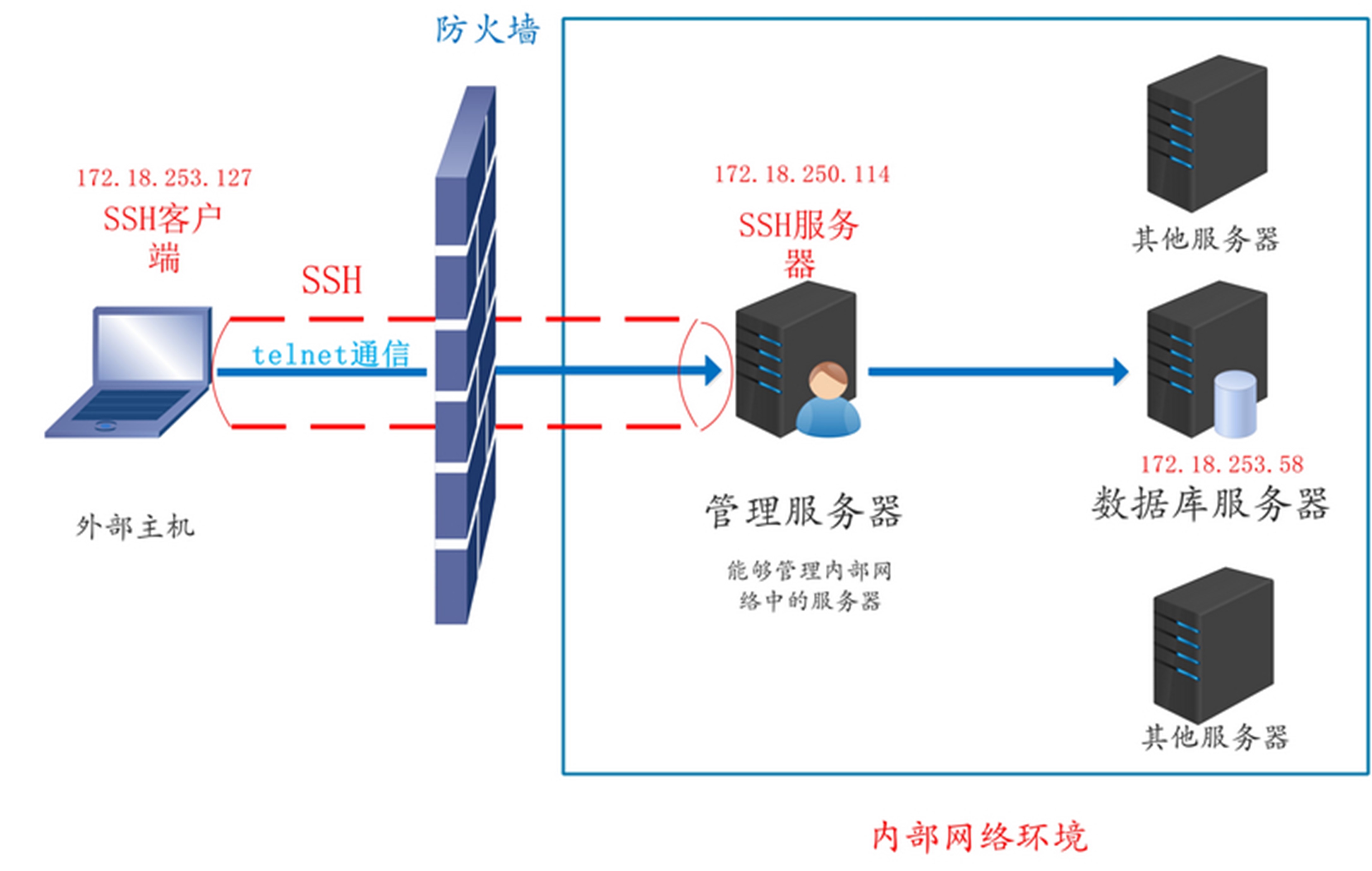
local

SSH 的本地端口转发的格式如下:

ssh -L local_port:remote_host:remote_host_port sshserver

本地端口转发有如下常用选项:

  • -f:将 SSH 客户端放到后台运行,保持连接但不阻塞终端。
  • -N:只建立端口转发,而不打开远程 shell 或执行命令。单独使用 -N 会阻塞终端(除非与 -f 一起使用)。
  • -g:启用网关功能,允许非本地主机通过 SSH 客户端的本地端口发起连接,

我们的实现如下所示。 这个过程是在外部主机(172.18.253.127)上进行操作:

ssh -L 9527:172.18.253.58:23 -Nf 172.18.250.114

通过本地监听端口,使用 telnet 协议就可以访问到内部的数据库服务器了:

telnet 127.0.0.1 9527

7.2.2、远程端口转发

场景:外部主机不能访问内部主机,但内部主机可以访问外部主机,实现外部主机访问内部数据库。
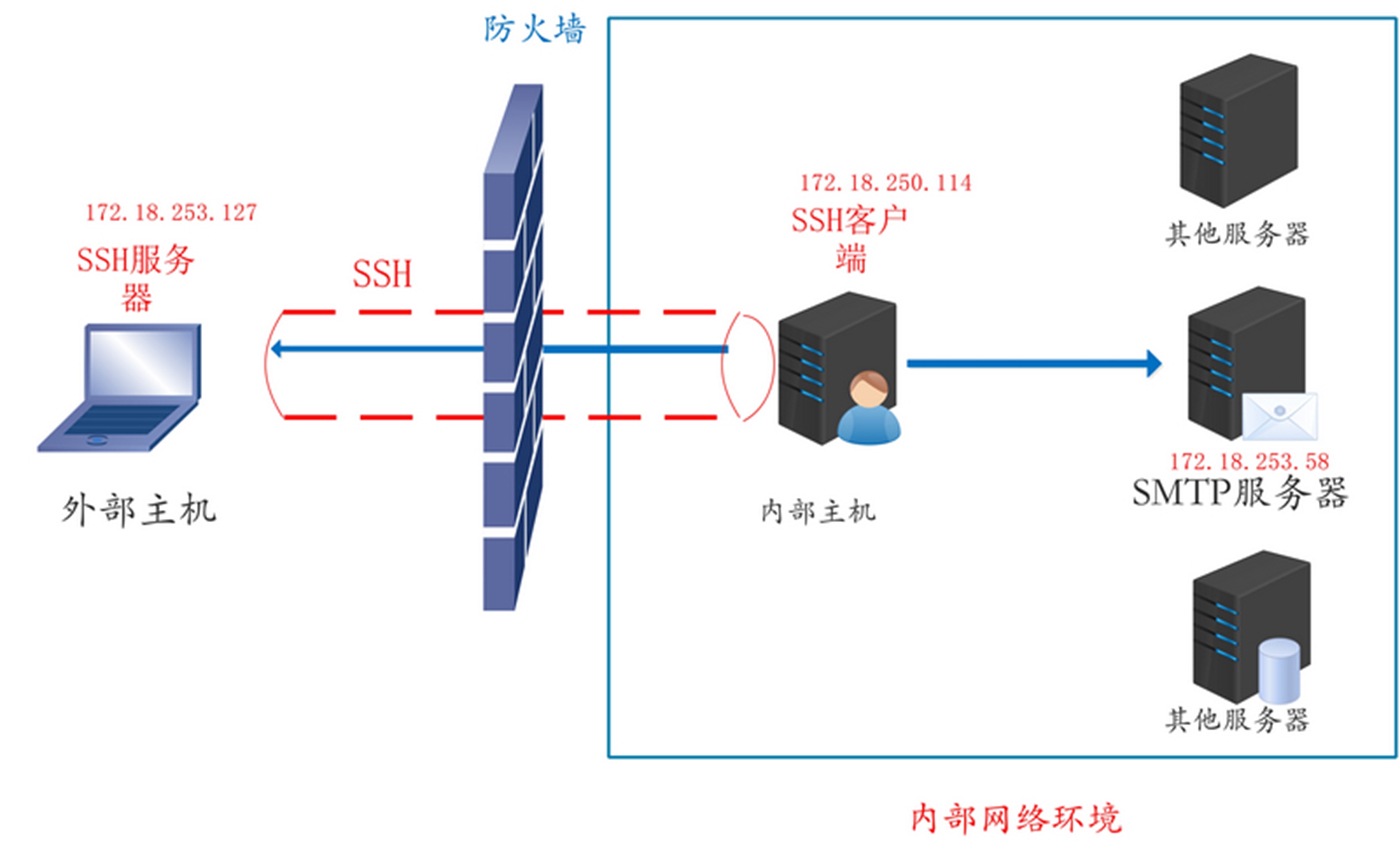
remote

SSH 远程端口转发的格式如下:

ssh -R sshserver_port:remote_host:remotehost_port sshserver

我们的实现如下所示。 这个过程是在内部主机(172.18.250.114)上进行的操作:

ssh -R 9527:172.18.253.58:25 -Nf 172.18.253.127

此时我们切换到外部主机(172.18.253.127),使用 ss -tnlpu 查看一下当前监听的端口,就会发现开启了 9527 端口。如果此时我们使用 telnet 命令连接一下本地的端口,就能够像 SMTP 服务器发起 SMTP 请求了。

telnet 127.0.0.1 9527 

7.2.3、动态端口转发

场景:我们在防火墙内部想要访问放火墙外面的网站,但是防火墙给我们开放了很少的端口。如何不受限制访问外面。
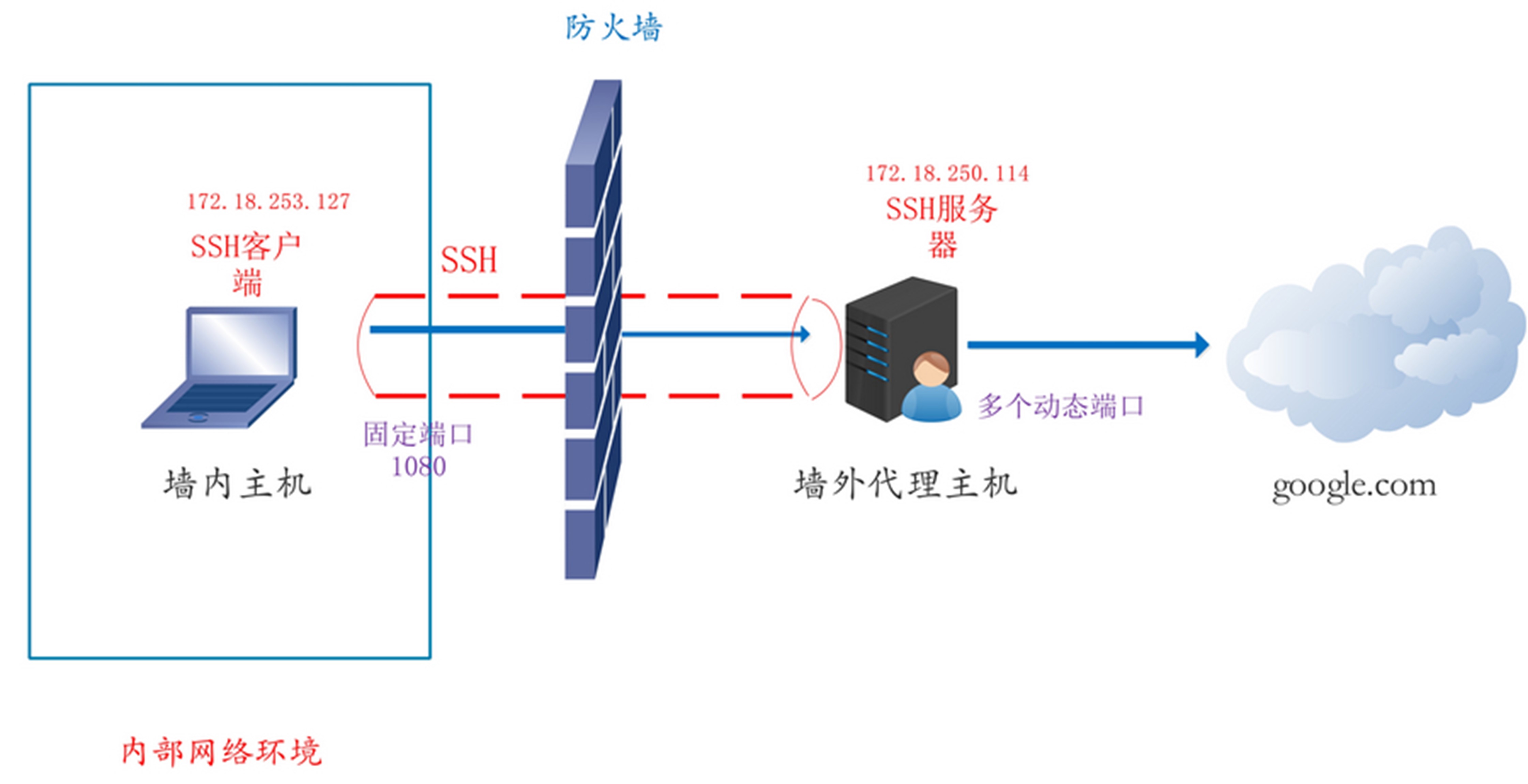
dynamic

SSH 动态端口转发的格式如下:

# ssh server 指的就是我们在放火墙之外的代理服务器
# 1080 也可以是其他可用端口
ssh -D 1080 root@sshserver

我们为墙内的主机设置一下动态代理,执行这条命令的是172.18.253.127

ssh -D 1080 root@172.18.250.114

这时通过动态转发,可以将墙内主机发起的请求,转发到墙外主机,而由墙外主机去真正地发起请求。而在墙内发起的请求,需要由 Socket 代理(Socket Proxy)转发到 SSH 绑定的 1080 端口。我们以火狐浏览器为例,配置本地的网络访问代理。找到设置 => 高级 => 网络 => 代理,然后设置成如下的内容。
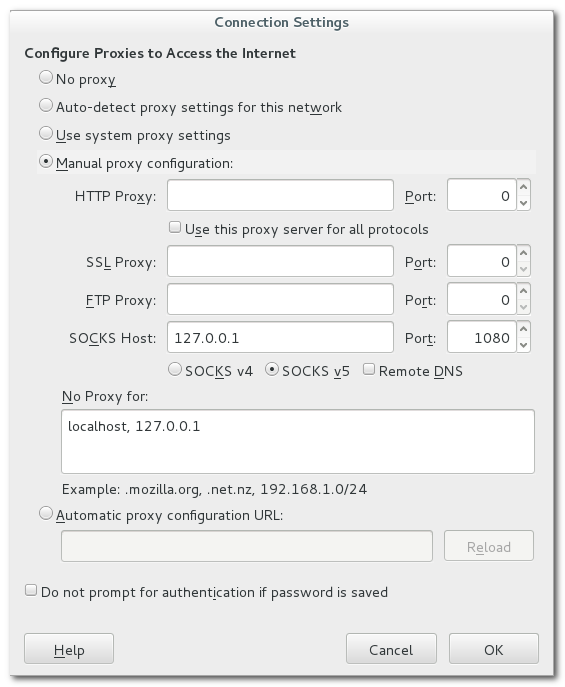
firefox_proxy

这样的话,Firefox 浏览器发起的请求都会转发到 1080 端口,然后通过 SSH 转发到真正的请求地址。

7.2.4、SSH 公钥认证原理与 sshd_config 对照

在 CentOS 8、openEuler 24.03、Kylin V10 等环境中,公钥登录失败往往并非「密钥未注册」,而是协议阶段、算法协商或文件权限某一环不匹配。本节按 OpenSSH 官方协议与 sshd_config(5) 梳理全链路,便于排错与维护。

参考资料

来源 说明
RFC 4251 SSH 协议架构(三层子协议)
RFC 4253 传输层:KEX、主机认证、加密与 MAC
RFC 4252 用户认证层:publickey 等方法
RFC 4254 连接层:会话、通道、端口转发
sshd_config(5) OpenSSH 服务端配置项权威说明
OpenSSH Release Notes 各版本默认算法变更(如 8.8 弃用 ssh-rsa

版本提示:OpenSSH 8.5+ 起多项指令更名(如 PubkeyAcceptedKeyTypesPubkeyAcceptedAlgorithms)。可用 ssh -Q help / sshd -T 查看当前系统实际生效值。


7.2.4.1、SSH 协议三层结构(RFC 4251)

SSH-2 不是单一「加密隧道」,而是三个子协议顺序叠加在 TCP 之上:

+------------------------------------------+
|  Connection Protocol (RFC 4254)          |  <- channels, shell, forwarding
+------------------------------------------+
|  User Authentication (RFC 4252)        |  <- publickey, password, ...
+------------------------------------------+
|  Transport Layer (RFC 4253)            |  <- KEX, host key, cipher, MAC
+------------------------------------------+
|  TCP                                     |
+------------------------------------------+

关键区分(排错时必记)

层次 认证对象 典型失败表现
传输层 服务器主机(host key) REMOTE HOST IDENTIFICATION HAS CHANGED、首次连接指纹确认
用户认证层 登录用户(user key) Permission denied (publickey)
连接层 已认证用户的会话能力 登录成功但无法 -L/-R 转发

传输层 RFC 4253 明确:该层只做主机认证,不做用户认证;用户公钥认证属于 RFC 4252。


7.2.4.2、连接建立三阶段

阶段 1:传输层握手(Transport / KEX)

目标:协商 KEX、主机密钥算法、对称加密、MAC/AEAD,导出会话密钥会话标识符 session_id(后续用户签名会绑定 session_id)。

Client                                         Server
  | ---- SSH_MSG_KEXINIT (algo lists) --------> |
  | <--- SSH_MSG_KEXINIT ---------------------- |
  | ---- KEX method messages (e.g. ECDH) ------> |
  | <--- KEX method + host key signature ------ |  <- server host auth
  | ---- SSH_MSG_NEWKEYS ---------------------> |
  | <--- SSH_MSG_NEWKEYS ---------------------- |
  | === encrypted channel from here =========== |

sshd_config 的对应

配置项 所属阶段 含义
KexAlgorithms KEX 密钥交换算法列表(如 curve25519-sha256diffie-hellman-group-exchange-sha256
HostKeyAlgorithms KEX / 主机认证 服务端用于签名的主机密钥算法(客户端用此验证服务器身份)
Ciphers 传输层数据保护 对称加密(如 aes128-ctraes256-gcm@openssh.com
MACs 传输层完整性 非 AEAD 模式下的 HMAC(如 hmac-sha2-256);GCM 等 AEAD 自带认证,通常不再单独协商 MAC
GSSAPIKexAlgorithms KEX(可选) 启用 GSSAPI/Kerberos 时的 KEX 算法;需 GSSAPIAuthentication yes 才有意义

关于 Protocol 2

  • 仅 SSH 协议版本 2;SSH v1 已废弃且存在已知漏洞。
  • OpenSSH 7.6+ 已移除 Protocol 指令(仅支持 v2)。在 CentOS 8 / 新系统上写 Protocol 2 可能被忽略或报错,可删除该行。

算法协商规则

  • 客户端与服务端各自发送算法列表,按服务端列表顺序取双方交集的第一个(非「客户端提议即采用」)。
  • KEX 导出共享秘密 K 与 exchange hash H,再派生加密密钥、完整性密钥及 session_id(RFC 4253 §7.2)。弱 KEX(如 diffie-hellman-group1-sha1)应禁用。
阶段 2:用户认证(User Auth / publickey)

传输层完成后,客户端请求 ssh-userauth 服务,进入 RFC 4252 公钥认证。

标准流程(RFC 4252 §7,非「服务器发随机 challenge」)

Client                                         Server
  | ---- SSH_MSG_SERVICE_REQUEST("ssh-userauth") -> |
  | <--- SSH_MSG_SERVICE_ACCEPT ------------------- |
  | ---- USERAUTH_REQUEST(publickey, key, no sig) > |  <- optional probe
  | <--- USERAUTH_PK_OK (if key acceptable) -------- |  <- optional
  | ---- USERAUTH_REQUEST(publickey, key, signature) > |
  |        signature over: session_id || auth_request |
  | <--- USERAUTH_SUCCESS --------------------------- |

要点:

  1. 客户端用私钥对固定字段签名,签名为 session_idSSH_MSG_USERAUTH_REQUEST 等字段的拼接(RFC 4252 §7),不是传统意义上的服务器随机 challenge-response。
  2. 服务器在 AuthorizedKeysFile(默认 ~/.ssh/authorized_keys)中查找公钥,并验证签名。
  3. 客户端可跳过 probe 直接发送带签名的请求;probe 用于减少无效签名运算。

sshd_config 的对应(认证阶段)

配置项 默认值(参考 man) 含义
PubkeyAuthentication yes 是否允许公钥认证
AuthorizedKeysFile .ssh/authorized_keys 授权公钥路径(相对用户家目录)
PubkeyAcceptedAlgorithms 随版本变化 接受的用户公钥签名算法;旧名 PubkeyAcceptedKeyTypes
PasswordAuthentication 随发行版而异 是否允许密码;生产建议 no 并配合公钥
AuthenticationMethods 未设置 强制多因素(如 publickey,password
StrictModes yes 检查家目录、~/.sshauthorized_keys 权限与属主
PermitRootLogin 随发行版而异 是否允许 root 公钥/密码登录
MaxAuthTries 6 单次连接最大认证尝试次数
LoginGraceTime 120 完成认证前的宽限时间(秒)
CASignatureAlgorithms 见 man 用户/主机证书 CA 签名算法(需配合 TrustedUserCAKeys 等)
RevokedKeys none 吊销公钥列表

已废弃或应禁用的主机认证相关项

配置项 说明
HostbasedAuthentication 默认 no;基于主机密钥+rhosts 的弱认证,应禁用
IgnoreRhosts 默认 yes;忽略 ~/.rhosts/etc/hosts.equiv
HostbasedAcceptedAlgorithms 仅当 HostbasedAuthentication yes 时有效;旧名 HostbasedAcceptedKeyTypes

权限要求(StrictModes yes 时)

路径 建议权限 常见错误
用户家目录 不可 group/world 写(如 755 或更严) 家目录 777 导致拒绝
~/.ssh 700 目录权限过宽
~/.ssh/authorized_keys 600 文件可被组/其他用户读取
私钥(客户端) 600 客户端拒绝使用权限过宽的私钥
阶段 3:连接层与会话(Connection)

用户认证成功后,RFC 4254 打开 channel(shell、exec、direct-tcpip 等)。下列参数不属于认证阶段,但常与安全加固一并配置:

配置项 默认 含义
AllowTcpForwarding yes 是否允许 -L/-R/-D 转发
AllowAgentForwarding yes 是否允许 -A 代理转发
GatewayPorts no 远程转发是否绑定非 loopback 地址
PermitTunnel no 是否允许 ssh -w 隧道设备
PermitUserEnvironment no 是否允许 ~/.ssh/environment 设置环境变量
X11Forwarding no 是否允许 X11 转发

空闲连接保活(传输层加密通道内)

配置项 含义
ClientAliveInterval 服务端每隔 N 秒向客户端发送 alive 消息(经加密通道,非 TCP keepalive)
ClientAliveCountMax 连续发送 alive 而未收到客户端数据的最大次数;超限则断开

正确理解 ClientAliveCountMax 0(原文有误):

  • 官方说明:设为 0 表示禁用因 alive 超时断开(不会触发超时断连)。
  • 默认值为 3。例如 ClientAliveInterval 15ClientAliveCountMax 3,约 45 秒无响应后断开。
  • 不是「设为 0 立即断开」。

7.2.4.3、公钥认证配置示例(生产加固参考)

以下为说明用片段,部署前请用 sshd -t 校验语法,用 sshd -T | grep -i pubkey 查看展开后的有效配置:

# --- Transport layer ---
KexAlgorithms curve25519-sha256,diffie-hellman-group-exchange-sha256
HostKeyAlgorithms ssh-ed25519,rsa-sha2-512,rsa-sha2-256
Ciphers aes128-ctr,aes256-gcm@openssh.com
MACs hmac-sha2-256,hmac-sha2-512

# --- User authentication ---
PubkeyAuthentication yes
PubkeyAcceptedAlgorithms ssh-ed25519,rsa-sha2-256,rsa-sha2-512
PasswordAuthentication no
PermitRootLogin no
StrictModes yes
MaxAuthTries 3
LoginGraceTime 60

# --- Connection / session hardening (optional) ---
AllowTcpForwarding no
AllowAgentForwarding no
GatewayPorts no
PermitTunnel no
PermitUserEnvironment no

# --- Keepalive (optional) ---
ClientAliveInterval 60
ClientAliveCountMax 3

客户端对应检查:

ssh -vvv user@host                 # 查看协商与认证失败点
ssh -Q PubkeyAcceptedAlgorithms    # 本地支持的公钥算法
ssh-keygen -lf ~/.ssh/id_ed25519.pub

7.2.4.4、新系统公钥登录失败:排查路径

由外到内顺序排查,避免只盯 authorized_keys

  TCP/防火墙 -> 传输层(KEX/主机密钥) -> 用户认证(公钥) -> 账户/SELinux/PAM
现象 / 日志线索 常见原因 处理方向
Permission denied (publickey) 公钥未写入、算法不在 PubkeyAcceptedAlgorithms、客户端未Offer对应私钥 核对 authorized_keysssh -vvvOffering public key;调整算法或换 ed25519
no matching host key type 客户端过旧或 HostKeyAlgorithms 过窄 服务端生成 ssh-ed25519 主机密钥;或客户端升级
sign_and_send_pubkey: ... unknown or unsupported key type OpenSSH 8.8+ 默认禁用 ssh-rsa SHA-1 客户端改用 ed25519/rsa-sha2-256;或临时调整算法(不推荐长期)
公钥已部署仍失败 + Authentication refused: bad ownership or modes StrictModes 权限不合规 修正 ~/.ssh700authorized_keys600、家目录不可 world-writable
仅特定发行版失败 SELinux、非标准家目录、NFS home restorecon -Rv ~/.ssh;确认 AuthorizedKeysFile 路径可达
Selected user key not registered(部分客户端文案) 多为上述权限或算法问题,而非字面「未注册」 优先查服务端 /var/log/securejournalctl -u sshd

算法不匹配诊断示例

# Server effective config
sshd -T | egrep 'pubkey|hostkey|kex|cipher|mac'

# Client offered algorithms
ssh -vvv user@host 2>&1 | egrep 'kex:|host key|Offering|Authentications'

7.2.4.5、常见问题速查

问题 简要回答
公钥认证和 TLS 客户端证书一样吗? 思路类似(私钥签名、公钥验签),但 SSH 绑定的是 session_id + USERAUTH 请求体(RFC 4252),且公钥条目在 authorized_keys
HostKeyAlgorithmsPubkeyAcceptedAlgorithms 区别? 前者约束服务器主机密钥;后者约束客户端用户公钥;二者不可混用
GCM 模式下还要配 MACs 吗? AEAD(如 aes256-gcm@openssh.com)自带完整性;MACs 对 AEAD 套件通常不生效
为何 CentOS 8 升级后旧 RSA 密钥失效? OpenSSH 8.x 起逐步弃用弱 RSA/SHA-1;建议迁移到 Ed25519
如何确认服务端实际接受哪些算法? sshd -T 输出为解析后的有效配置,优先于肉眼读配置文件

7.3、frp

官方仓库:https://github.com/fatedier/frp

官方文档:https://gofrp.org/zh-cn/docs/

7.3.1、frp 原理

参考:https://juejin.cn/post/7249286574521581624
参考:https://zhuanlan.zhihu.com/p/403361038

frp 是什么?

frp 是一款高性能的反向代理应用,专注于内网穿透。它支持多种协议,包括 TCP、UDP、HTTP、HTTPS 等,并且具备 P2P 通信功能。使用 frp,您可以安全、便捷地将内网服务暴露到公网,通过拥有公网 IP 的节点进行中转。

为什么选择 frp?

通过在具有公网 IP 的节点上部署 frp 服务端,您可以轻松地将内网服务穿透到公网,并享受以下专业特性:

  • 多种协议支持:客户端服务端通信支持 TCP、QUIC、KCP 和 Websocket 等多种协议。
  • TCP 连接流式复用:在单个连接上承载多个请求,减少连接建立时间,降低请求延迟。
  • 代理组间的负载均衡。
  • 端口复用:多个服务可以通过同一个服务端端口暴露。
  • P2P 通信:流量不必经过服务器中转,充分利用带宽资源。
  • 客户端插件:提供多个原生支持的客户端插件,如静态文件查看、HTTPS/HTTP 协议转换、HTTP、SOCKS5 代理等,以便满足各种需求。
  • 服务端插件系统:高度可扩展的服务端插件系统,便于根据自身需求进行功能扩展。
  • 用户友好的 UI 页面:提供服务端和客户端的用户界面,使配置和监控变得更加方便。

官方示例够用了 https://gofrp.org/zh-cn/docs/examples/

通过简单配置 TCP 类型的代理,使用户能够访问内网服务器。

步骤

  1. 在具有公网 IP 的机器上部署 frps

    部署 frps 并编辑 frps.toml 文件。以下是简化的配置,其中设置了 frp 服务器用于接收客户端连接的端口:

    bindPort = 7000
  2. 在需要被访问的内网机器上部署 frpc

    部署 frpc 并编辑 frpc.toml 文件,假设 frps 所在服务器的公网 IP 地址为 x.x.x.x。以下是示例配置:

    serverAddr = "x.x.x.x"
    serverPort = 7000
    
    [[proxies]]
    name = "ssh"
    type = "tcp"
    localIP = "127.0.0.1"
    localPort = 22
    remotePort = 6000
    • localIPlocalPort 配置为需要从公网访问的内网服务的地址和端口。
    • remotePort 表示在 frp 服务端监听的端口,访问此端口的流量将被转发到本地服务的相应端口。
      • 注意,仅启动 frps 服务端是没有 remotePort 端口监听的,只有 frpc 客户端启动,连接 frps 服务端时,remotePort 端口才会送到服务端,服务端开始监听该端口。
  3. 启动 frps 和 frpc

    参考官网配置 systemd 服务 https://gofrp.org/zh-cn/docs/setup/systemd/

  4. 通过 SSH 访问内网机器

    使用以下命令通过 SSH 访问内网机器,假设用户名为 test:

    ssh -o Port=6000 test@x.x.x.x

    frp 将请求发送到 x.x.x.x:6000 的流量转发到内网机器的 22 端口。

配置 tls 服务端:

# 1. 进入工作目录
cd /usr/local/tls-frp

# 2. 生成新的 CA 密钥和根证书
openssl genrsa -out ca.key 2048
openssl req -x509 -new -nodes -key ca.key -subj "/CN=FRP CA" -days 3650 -out ca.crt

# 3. 生成服务端证书 (server.crt / server.key) —— 已添加 SAN 扩展
#    ⚠️ 请将下面的 IP 和 DNS 替换为你的实际值
openssl genrsa -out server.key 2048
openssl req -new -key server.key -subj "/CN=你的服务端IP或域名" -out server.csr

# 关键:签发证书时添加 SAN 扩展(解决 certificate relies on legacy Common Name field 错误)
# 如果只有 IP 地址:
openssl x509 -req -in server.csr -CA ca.crt -CAkey ca.key -CAcreateserial \
  -out server.crt -days 3650 -sha256 \
  -extfile <(printf "subjectAltName=IP:你的服务端公网IP")

# 如果同时有 IP 和域名(二选一,按实际情况执行):
# openssl x509 -req -in server.csr -CA ca.crt -CAkey ca.key -CAcreateserial \
#   -out server.crt -days 3650 -sha256 \
#   -extfile <(printf "subjectAltName=IP:你的服务端公网IP,DNS:你的域名.com")

# 4. 生成客户端证书 (client.crt / client.key) —— 客户端不需要 SAN
openssl genrsa -out client.key 2048
openssl req -new -key client.key -subj "/CN=frpc-client" -out client.csr
openssl x509 -req -in client.csr -CA ca.crt -CAkey ca.key -CAcreateserial \
  -out client.crt -days 3650 -sha256

# 5. 确认所有新文件都已生成
ls -1 ca.crt ca.key server.crt server.key client.crt client.key

# 6. 验证服务端证书是否包含 SAN(这一步很重要)
openssl x509 -in server.crt -noout -text | grep -A1 "Subject Alternative Name"
# frps.toml
bindPort = 3456
auth.method = "token"
auth.token = "abc^dt237sTls"

transport.tls.force = true
transport.tls.certFile = "/usr/local/tls-frp/server.crt"
transport.tls.keyFile = "/usr/local/tls-frp/server.key"
transport.tls.trustedCaFile = "/usr/local/tls-frp/ca.crt"
# frpc.toml
serverAddr = "108.23.140.2"
serverPort = 3456
auth.method = "token"
auth.token = "abc^dt237sTls"

transport.tls.enable = true
transport.tls.certFile = "/usr/local/tls-frp/client.crt"
transport.tls.keyFile = "/usr/local/tls-frp/client.key"
transport.tls.trustedCaFile = "/usr/local/tls-frp/ca.crt"

[[proxies]]
name = "proxy"
type = "udp"
localIP = "172.18.0.2"
localPort = 3941
remotePort = 35062

官方仓库有完整的配置参考 https://github.com/fatedier/frp/tree/dev/conf ,当然官方文档也有详细说明,一般从完整配置中取一部分也就够用了。

7.3.2、frp 问题

我遇到了一个问题,就是使用 frp 转发 openvpn 的 tcp 端口时,出现如下问题:

Jun 11 12:29:42 k8s-pre-node01 openvpn: TCP connection established with [AF_INET]172.31.1.46:50990
Jun 11 12:29:42 k8s-pre-node01 openvpn: 172.31.1.46:50990 Connection reset, restarting [0]
Jun 11 12:29:42 k8s-pre-node01 openvpn: 172.31.1.46:50990 SIGUSR1[soft,connection-reset] received, client-instance restarting
Jun 11 12:29:42 k8s-pre-node01 openvpn: TCP connection established with [AF_INET]172.31.1.46:50992
Jun 11 12:29:42 k8s-pre-node01 openvpn: 172.31.1.46:50992 Connection reset, restarting [0]
Jun 11 12:29:42 k8s-pre-node01 openvpn: 172.31.1.46:50992 SIGUSR1[soft,connection-reset] received, client-instance restarting
Jun 11 12:29:42 k8s-pre-node01 openvpn: TCP connection established with [AF_INET]172.31.1.46:50994
Jun 11 12:29:42 k8s-pre-node01 openvpn: 172.31.1.46:50994 Connection reset, restarting [0]
Jun 11 12:29:42 k8s-pre-node01 openvpn: 172.31.1.46:50994 SIGUSR1[soft,connection-reset] received, client-instance restarting
Jun 11 12:29:42 k8s-pre-node01 openvpn: TCP connection established with [AF_INET]172.31.1.46:50996
Jun 11 12:29:42 k8s-pre-node01 openvpn: 172.31.1.46:50996 Connection reset, restarting [0]
Jun 11 12:29:42 k8s-pre-node01 openvpn: 172.31.1.46:50996 SIGUSR1[soft,connection-reset] received, client-instance restarting
Jun 11 12:29:42 k8s-pre-node01 openvpn: TCP connection established with [AF_INET]172.31.1.46:50998
Jun 11 12:29:42 k8s-pre-node01 openvpn: 172.31.1.46:50998 Connection reset, restarting [0]
Jun 11 12:29:42 k8s-pre-node01 openvpn: 172.31.1.46:50998 SIGUSR1[soft,connection-reset] received, client-instance restarting

通过跟 openvpn 开源社区的讨论,最后发现这是我自己搞的一个乌龙 https://github.com/OpenVPN/openvpn/issues/764

我的内网穿透都是使用华为云上面的 ELB 实现的,ELB 都有 health check,默认每隔 5s ELB TCP health check 就会对 frps 上绑定的客户端(frpc)端口(remotePort)发起请求探测,确认是否健康。正好对应上面的日志,看起来像是问题,实际上这是 openvpn 正常的响应日志。

另外,如果把 openvpn 配置成 udp 协议,就算 ELB UDP health check 不停请求,openvpn 也不会输出 UDP connection established, Connection reset, restarting 类似日志,所以可以使用 openvpn udp 协议,避免大量日志输出。当然也可以把 health check 关掉。

7.4、vnc

下面基于 x11 框架搭建 vnc 远程,编写脚本安装 x11vncserver。

这个脚本只适配过 deepin 系统,可能 ubuntu 也行,但是 RHEL 不适用。

#!/bin/bash

# 配置变量
PASSWORD="123456"  # 登录账号的密码
LOG_FILE="/var/log/x11vnc_setup.log"  # 日志文件路径
PASSWD_FILE="/etc/x11vnc.pass"  # x11vnc 密码文件路径
SERVICE_FILE="/etc/systemd/system/x11vnc.service"  # 服务文件路径

# 初始化日志文件
init_log() {
    echo "初始化日志文件..." | tee -a "$LOG_FILE"
    touch "$LOG_FILE" || { echo "无法创建日志文件 $LOG_FILE"; exit 1; }
    echo "日志文件初始化完成。" | tee -a "$LOG_FILE"
}

# 安装 x11vnc
install_x11vnc() {
    echo "开始安装 x11vnc..." | tee -a "$LOG_FILE"
    echo "$PASSWORD" | sudo -S apt update && sudo apt install x11vnc -y >> "$LOG_FILE" 2>&1
    if [ $? -eq 0 ]; then
        echo "x11vnc 安装成功。" | tee -a "$LOG_FILE"
    else
        echo "x11vnc 安装失败,请检查日志文件 $LOG_FILE。" | tee -a "$LOG_FILE"
        exit 1
    fi
}

# 设置 x11vnc 密码
set_x11vnc_password() {
    echo "设置 x11vnc 密码..." | tee -a "$LOG_FILE"
    echo "$PASSWORD" | sudo -S x11vnc -storepasswd "$PASSWORD" "$PASSWD_FILE" >> "$LOG_FILE" 2>&1
    if [ $? -eq 0 ]; then
        echo "x11vnc 密码设置成功。" | tee -a "$LOG_FILE"
    else
        echo "x11vnc 密码设置失败,请检查日志文件 $LOG_FILE。" | tee -a "$LOG_FILE"
        exit 1
    fi
}

# 创建 x11vnc 服务文件
create_service_file() {
    echo "创建 x11vnc 服务文件..." | tee -a "$LOG_FILE"
    sudo tee "$SERVICE_FILE" > /dev/null <<EOF
[Unit]
Description=Remote desktop service (VNC)
Requires=display-manager.service
After=display-manager.service

[Service]
Type=simple
ExecStart=/usr/bin/x11vnc -auth guess -forever -rfbauth $PASSWD_FILE -rfbport 5900 -shared
ExecStop=/usr/bin/killall x11vnc

[Install]
WantedBy=multi-user.target
EOF
    if [ $? -eq 0 ]; then
        echo "服务文件创建成功。" | tee -a "$LOG_FILE"
    else
        echo "服务文件创建失败,请检查日志文件 $LOG_FILE。" | tee -a "$LOG_FILE"
        exit 1
    fi
}

# 加载并启动服务
enable_and_start_service() {
    echo "加载服务配置..." | tee -a "$LOG_FILE"
    sudo systemctl daemon-reload >> "$LOG_FILE" 2>&1
    if [ $? -ne 0 ]; then
        echo "服务配置加载失败,请检查日志文件 $LOG_FILE。" | tee -a "$LOG_FILE"
        exit 1
    fi

    echo "启动 x11vnc 服务..." | tee -a "$LOG_FILE"
    sudo systemctl start x11vnc >> "$LOG_FILE" 2>&1
    if [ $? -eq 0 ]; then
        echo "x11vnc 服务启动成功。" | tee -a "$LOG_FILE"
    else
        echo "x11vnc 服务启动失败,请检查日志文件 $LOG_FILE。" | tee -a "$LOG_FILE"
        exit 1
    fi

    echo "设置 x11vnc 服务自启动..." | tee -a "$LOG_FILE"
    sudo systemctl enable x11vnc >> "$LOG_FILE" 2>&1
    if [ $? -eq 0 ]; then
        echo "x11vnc 服务自启动设置成功。" | tee -a "$LOG_FILE"
    else
        echo "x11vnc 服务自启动设置失败,请检查日志文件 $LOG_FILE。" | tee -a "$LOG_FILE"
        exit 1
    fi
}

# 主函数
main() {
    init_log
    install_x11vnc
    set_x11vnc_password
    create_service_file
    enable_and_start_service
    echo "x11vnc 服务配置完成!" | tee -a "$LOG_FILE"
}

# 执行主函数
main

将脚本保存为 setup_x11vnc.sh。

赋予执行权限:

chmod +x setup_x11vnc.sh

问题:x11vnc server 所在的服务器如果没有接显示器,则无法自适应分辨率,可能采用默认的分辨率,大概是 640x400,客户端连接时会花屏或者分辨 率过低无法使用。

解决:
先写个脚本 display-setup.sh,放在类似 /etc/lightdm/ 这个文件夹下,此处以 /etc/lightdm/display-setup.sh 为例:

#!/bin/bash
xrandr --fb 1920x1080 --rate 60 # 设置分辨率和刷新率
exit 0 # 可能要加上,防止上一步设置出错导致脚本异常退出,lightdm 起不来

然后修改 /etc/lightdm/lightdm.conf,找到 [Seat:*] 配置部分,把原来的 #display-setup-script= 改成 display-setup-script=/etc/lightdm/display-setup.sh,保存后执行 systemctl restart lightdm 重启 LightDM 即可生效,即使没有连接显示器也可以保证 VNC 远程时分辨率和刷新率正常

  • xrandr 是 X11 的一个工具,用于设置屏幕分辨率、刷新率等参数。

  • 你在 display-setup-script 中使用 xrandr --fb 1920x1080 --rate 60 强制将显示器的分辨率设置为 1920x1080,刷新率为 60Hz。

  • 这样,即使没有物理显示器,X11 也会使用你指定的分辨率,VNC 连接时就不会出现分辨率不正确或花屏的问题。

标签云